
How to Download Your e-EPIC (Digital Voter ID)
The e-EPIC is the official PDF version of your Voter ID, free, QR-coded, and legally valid as photo ID. This guide covers the exact download steps, what to do if your mobile isn’t registered, how to find your EPIC number, and the PDF password.

What You Need
- Your EPIC number (the 10-character code on your voter card, e.g. ABC1234567), or your Form Reference Number if you recently applied and don’t have the card yet.
- Access to the mobile number registered against your voter record, for the OTP. If it isn’t registered, there’s a separate path below.
Downloading Your e-EPIC
Works the same on the portal and the Voter Helpline app.
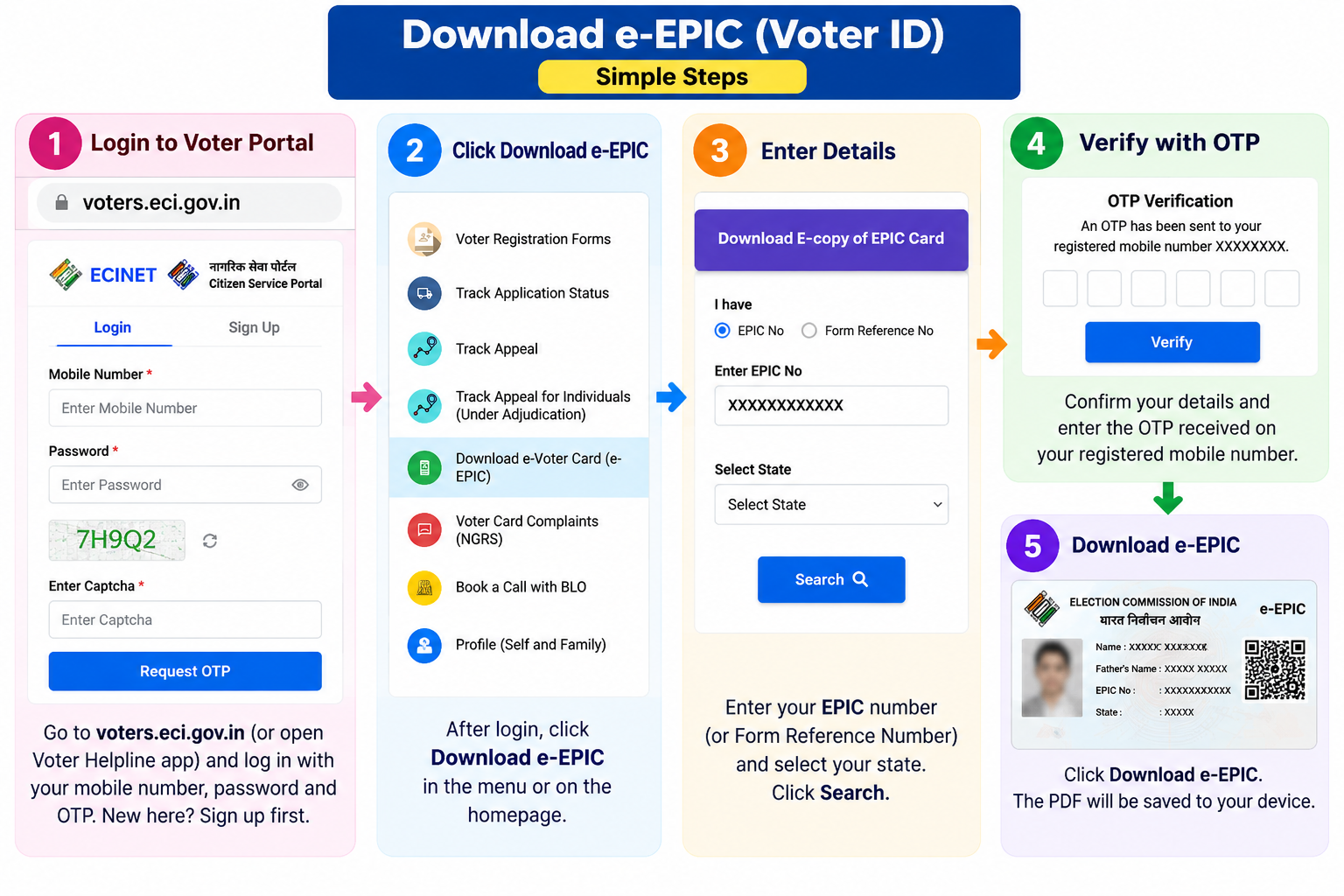
- Go to
voters.eci.gov.in(or open the Voter Helpline app) and log in with your mobile number, password, and OTP. New here? Sign up first. - Click Download e-EPIC (in the menu or on the homepage).
- Enter your EPIC number (or Form Reference Number) and select your state if prompted.
- The system shows your elector record, confirm it’s you.
- Request the OTP to your registered mobile, enter it to verify.
- Click Download e-EPIC, the PDF saves to your device.
If Your Mobile Isn’t Registered
No OTP will reach you if your number isn’t linked to your EPIC. The portal handles this with a one-time e-KYC step, you don’t have to visit an office:
- On the Download e-EPIC screen, enter your EPIC number and click the e-KYC link.
- Complete the Face Liveness verification, the portal captures a live photo (with small random movements it prompts) and matches it against the photo in your EPIC record.
- Once matched, add and verify a new mobile number to complete the KYC.
- Your e-EPIC then becomes available to download.
Don’t Know Your EPIC Number?
You can find it before downloading:
- Open Search in Electoral Roll on voters.eci.gov.in (or electoralsearch.eci.gov.in).
- Choose Search by Details and enter your name, state, district, and date of birth, or search by your registered mobile via OTP.
- Your record appears with the EPIC number shown, note it, then return to Download e-EPIC.
Opening the Password-Protected PDF
DDMMYYYY format, no slashes or spaces. For 15 May 1992, it’s 15051992. If your record has only a year of birth (no full date), the portal shows the exact format to use on screen, follow that.
Download Not Working? Common Fixes
- “Please try again later”: usually server overload during elections or a roll revision, not a problem with your account. Try again off-peak (early morning or late night), or use the Voter Helpline app instead of the browser.
- “e-EPIC not available” / “record not found”: your card may not be digitised yet, or the EPIC number is mistyped. Double-check the number, and if you applied recently, wait until your name is on the roll (about 2 to 3 days after approval).
- OTP not arriving: the registered mobile isn’t your current one. Use the e-KYC face route above, or update your number via Form 8.
- Face Liveness failing: it compares your live photo to the one on your record. It fails in poor light, with a dirty lens, or when you wear glasses/a mask, or if your appearance has changed a lot. Try in natural daylight, clean the camera, and remove accessories.
- Details mismatch: enter your name and details exactly as they appear on the electoral roll, not as on other IDs. If the roll itself is wrong, fix it with a correction (Form 8) first.
Is the e-EPIC Actually Valid?
Yes. The e-EPIC is a digitally signed, non-editable PDF with a secure QR code, introduced by the Election Commission in 2021. It holds the same legal standing as the physical card:
- Valid for voting and as identity/address proof under the Representation of the People Act.
- Accepted for KYC at most banks and for domestic flights, though a few offices may still prefer the physical card, so carry both when you can.
- Can be stored in DigiLocker or printed and self-laminated for daily use.
If the name, photo, or any detail on your e-EPIC is wrong, don’t just re-download, fix it with a correction request (Form 8), then download a fresh copy.
Common Questions
Is downloading the e-EPIC free?
Yes, completely free from voters.eci.gov.in or the Voter Helpline app. There’s no charge at any step. Any site or agent asking for a fee to “download your voter ID” is not official.
Can I download someone else’s e-EPIC, like a family member’s?
Only if the OTP goes to a mobile you can access. e-EPIC is downloaded per voter, verified by an OTP to the number registered against that specific EPIC. Each person generally downloads their own.
I just registered, why can’t I download my e-EPIC yet?
It only becomes available once your name is actually added to the electoral roll, usually about 2 to 3 working days after approval. Check your application status first, if it still shows under process, wait for approval.
Do I still need the physical PVC voter card?
Not necessarily, the e-EPIC is fully valid on its own. If you do want the plastic card, you can collect or request it from your electoral office, but it’s optional. Many people simply keep the e-EPIC on their phone or in DigiLocker.
Need Help?
For download errors or a mobile-update issue, call the Election Commission’s voter helpline at 1950, or use the grievance section on voters.eci.gov.in. For all voter services, see our Voter ID hub.