
How to Check Your Aadhaar Enrolment & Update Status
Applied for a new Aadhaar or submitted an update? Track your request online, by phone, or at a centre. Here are the reference numbers you need and every method explained.

The Reference Numbers You’ll Need
Before checking your status, you’ll need the reference number from your acknowledgment slip or app confirmation. Which one you have depends on how you applied.
- Enrolment ID (EID): a 28-digit reference made up of a 14-digit enrolment number followed by a 14-digit date-and-time stamp. It’s printed on the slip you get when you apply for a new Aadhaar.
- Update Request Number (URN): generated when you update details offline at a Seva Kendra or online through the myAadhaar portal.
- Service Request Number (SRN): generated when you use the official Aadhaar app, such as for a mobile update or to order a PVC card.
Lost Your EID or URN?
If you’ve misplaced your acknowledgment slip, you can recover the number instead of starting over. On the portal, use the Retrieve EID / Aadhaar Number option: enter your name and registered mobile or email, verify with an OTP, and UIDAI sends the reference back to you. If you can’t recover it online, call 1947 for help. Never share your details with a private “recovery agent”, UIDAI never charges to retrieve a lost EID.
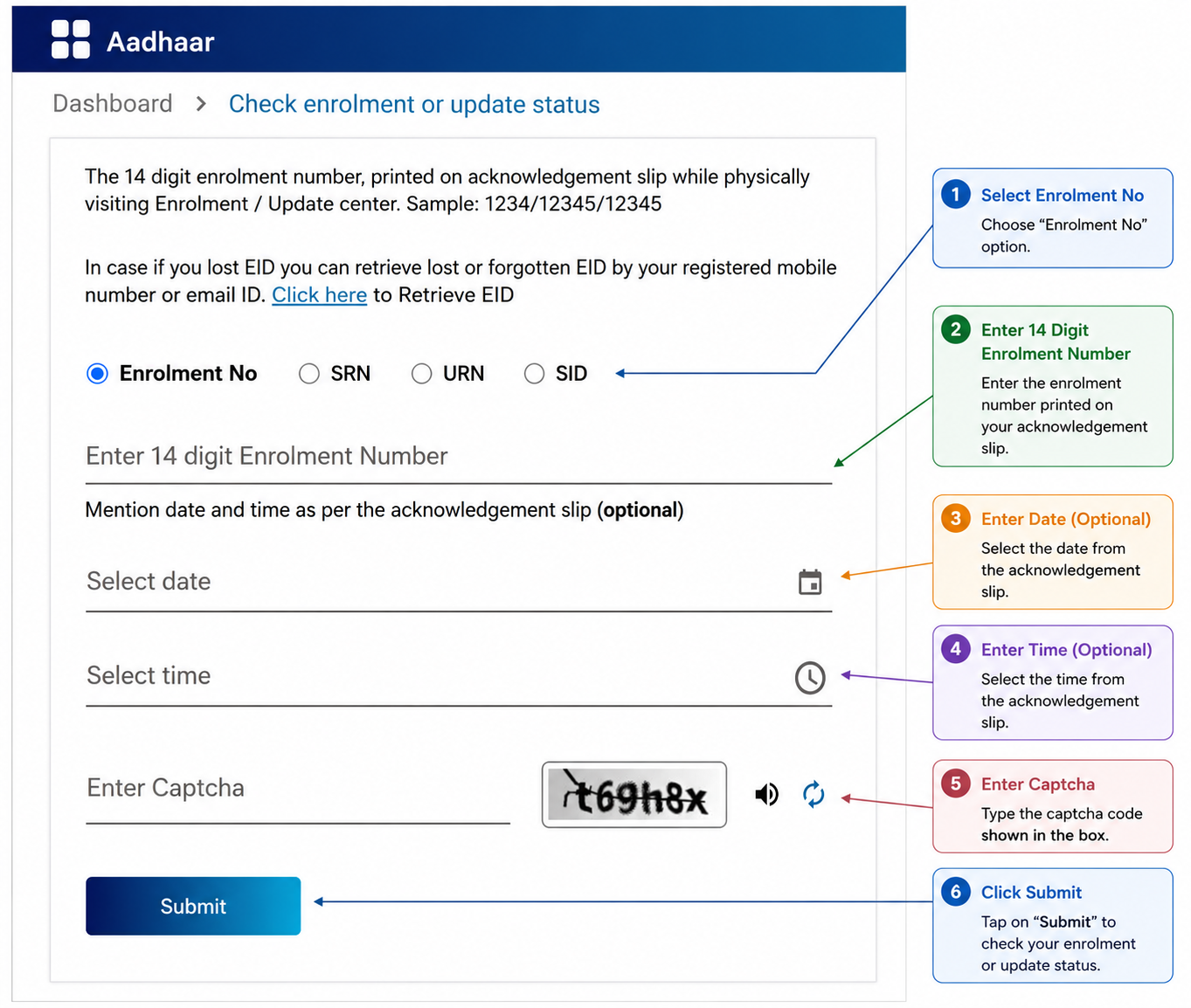
Method 1: Check Online via myAadhaar Portal
The quickest way to check your status is through the official UIDAI website.
- Visit the portal: go to
myaadhaar.uidai.gov.in. - Select the service: click Check Enrolment and Update Status.
- Enter details: enter your full 28-digit EID (with date and time), or your URN or SRN, exactly as it appears on your receipt.
- Captcha: enter the security captcha shown on screen.
- Submit: click Submit to view your current status.
What the Status Messages Mean
- Under process / In progress: your request is still being reviewed. No action needed yet.
- Generated / Completed successfully: your Aadhaar has been created or updated. You can now download your e-Aadhaar.
- Rejected: there was an issue, such as a document mismatch. Check the stated reason and submit a fresh request addressing it.
Method 2: Check by Phone (1947)
No internet access? You can check your status over the phone.
- Dial: call the UIDAI toll-free number 1947 from your registered mobile.
- Follow the prompts: choose your language, then select enrolment status or update status from the menu.
- Provide details: enter your EID or URN when prompted, and the system reads out your current status.
Method 3: Check at a Centre
You can also check your status in person.
- Visit a centre: go to your nearest Aadhaar Seva Kendra or enrolment centre.
- Provide your reference: show your acknowledgment slip with the EID (new enrolments) or URN (updates).
- Get the status: the executive looks it up and tells you the current status.
How Long It Takes & Common Questions
How long does a new Aadhaar or update take to process?
UIDAI’s official indication is roughly 10 to 90 days, depending on the type of request and verification. In practice, most complete much sooner, often within a couple of weeks. The 90-day figure is an outer limit, not the usual wait.
My status still shows “under process” after several weeks. What now?
As long as it hasn’t crossed the 90-day window, it’s usually just still in the verification queue. If it’s been significantly longer, call 1947 with your EID or URN ready so UIDAI can look into where it’s stuck.
Is checking my Aadhaar status free?
Yes. Checking enrolment or update status is always free, on the portal, by phone, or at a centre. Anyone charging you just to check a status is not an official UIDAI channel.
My request was rejected. Do I have to pay again?
If a fresh request is needed to fix the issue, the standard update fee applies again to that new request. Check the rejection reason first, correct it (for example, a clearer document), and resubmit so it isn’t rejected a second time.
When to Reach Out to UIDAI
If a request is stuck well past the usual window, or a rejection doesn’t make sense, call 1947 (open 24/7) with your reference number handy. All official Aadhaar contacts are on our quick reference page.