
How to Download the Electoral Roll (Voter List) PDF
Want to check if your name is on the voter list, or download your booth’s full roll? The Election Commission publishes it free as a PDF. This guide covers the exact steps, the part number you need first, draft vs final rolls, and how to find your own entry fast.

First: Draft Roll or Final Roll?
The portal offers different versions of the roll, pick the right one:
- Draft Roll: a provisional list published for public inspection, so people can file claims, corrections, or objections before it’s finalised. During a Special Intensive Revision (SIR), this is the one to check to confirm your name survived the revision.
- Final Roll: the verified, official list published after all Form 6 (additions), Form 7 (deletions), and Form 8 (corrections) are processed. This is the roll used on election day.
If you’re checking around a revision or election, download the latest version available for your state, the portal labels each with its year and type.
You’ll Need Your Part Number First
Find it in a minute using Electoral Search:
- Go to
electoralsearch.eci.gov.inand open Search by Details (or Search by EPIC if you have your EPIC number). - Enter your details, state, district, and constituency, and the captcha, then Search.
- Your result shows your Part Number and Part Serial Number, note both. The part number tells you which PDF to download; the serial number helps you jump straight to your entry inside it.
Downloading the Roll PDF
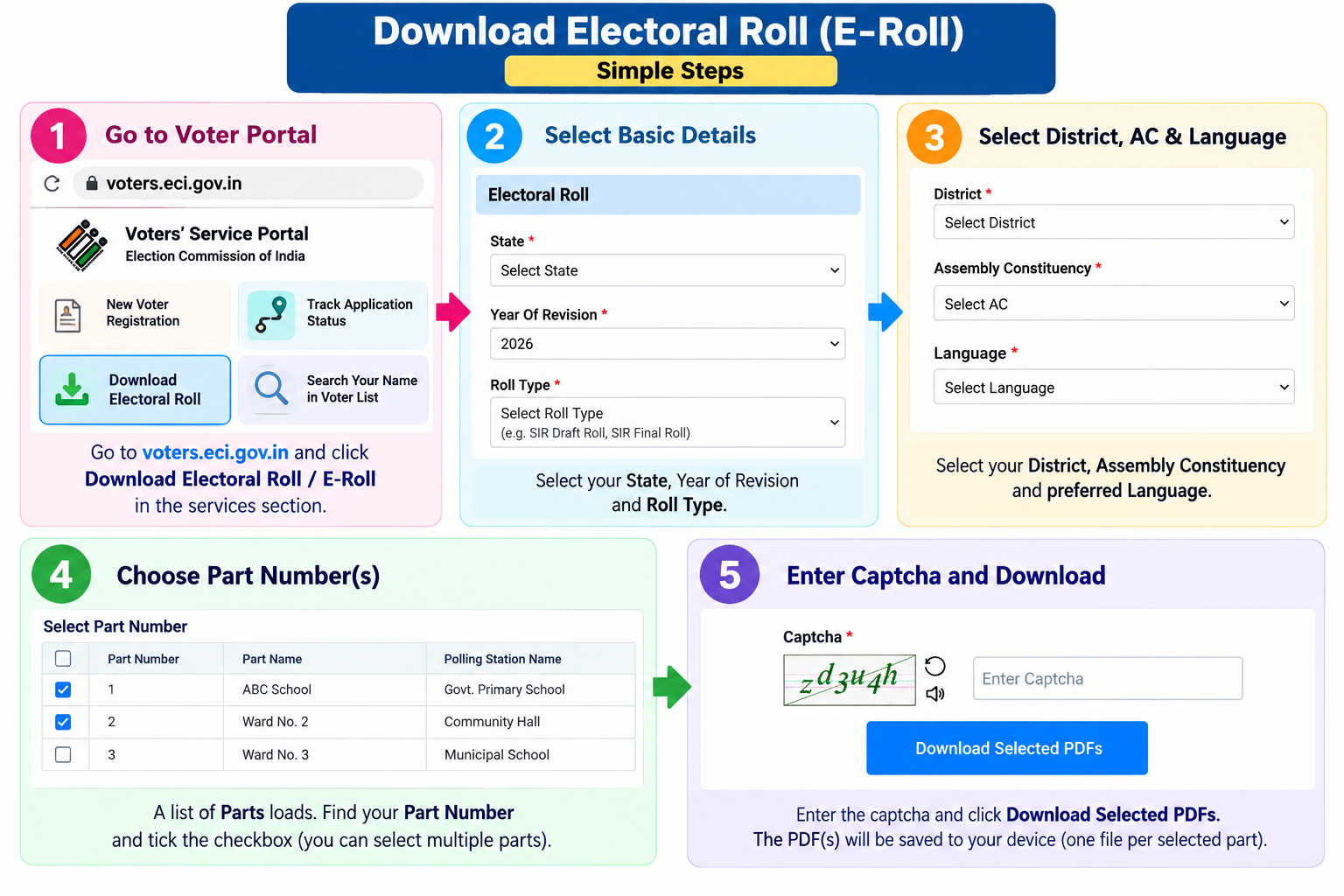
On the portal, the Electoral Roll page starts with just a few fields and reveals the rest as you go.
- Open the Download Electoral Roll service on
voters.eci.gov.in. - Select your State and the Year of Revision (e.g. 2026).
- Once the state loads, choose the Roll Type (SIR Draft Roll, SIR Final Roll, etc.), then your District, Assembly Constituency, and Language.
- A list of Parts (booths) appears. Find your Part Number and tick the checkbox next to it, you can tick several to download in bulk.
- Enter the captcha (there’s a refresh and an audio option if it’s hard to read) and click Download Selected PDFs.
- The PDF saves to your device, one file per selected part.
What the PDF Contains
Each roll PDF is booth-wise and lists, for every voter in that part: part serial number, name, father’s or husband’s name, house number, age, gender, and the EPIC number (photos appear where available). At the top you’ll also find the polling station name and address for that booth.
Finding Your Own Entry Quickly
A single part can have 500 to 1,000+ names, don’t scroll the whole thing:
- If the PDF is text-searchable, use Ctrl+F (or your PDF app’s search) and type your name or EPIC number.
- Otherwise, jump straight to your Part Serial Number (the one you noted from Electoral Search), entries are ordered by it.
- Cross-check the spelling, age, and relative’s name against your records while you’re there, catching an error now is easier than at the polling booth.
If Your Name Is Missing or Wrong
- Name missing entirely: if you were dropped during a revision or never registered, file Form 6 for inclusion.
- Details wrong (spelling, age, address): correct them with Form 8.
- A duplicate or a deceased/shifted voter listed: that’s a Form 7 (objection/deletion) matter.
- Not sure why you’re missing: contact your Booth Level Officer (BLO) or call the voter helpline on 1950. During a draft-roll period, file your claim before the objection deadline for your state.
If Your State Is Under SIR Right Now
SIR stands for Special Intensive Revision, a big clean-up of the voter list the Election Commission runs state by state. Booth officers go door to door, verify everyone, and remove entries that are duplicate, shifted, or of people who have passed away. Because names can get dropped in this process, downloading the draft roll and checking that you’re still on it matters more than usual.
Here’s the simple version of how it flows:
- Draft roll is published, this is your cue to check your name.
- Claims & objections window opens, if you’re missing or an entry is wrong, this is when you file Form 6, 7, or 8. There’s a deadline, and it’s easy to miss.
- Final roll is published, the verified list used at the election.
Deadlines differ by state and the Commission often extends them, so don’t rely on a date you saw somewhere. Check the current dates on your own state’s Chief Electoral Officer (CEO) website, and if in doubt, call 1950. The key thing: if your name is missing from the draft, act within the claims window, don’t wait for the final roll.
Common Questions
Is downloading the electoral roll free?
Yes, entirely free from voters.eci.gov.in. No login is needed, just select your area, enter the captcha, and download. Avoid third-party sites that charge for it or host outdated copies.
Do I need to log in or give an OTP to download the roll?
No. The electoral roll is a public document, downloading it needs only your state/constituency selection and a captcha, no account or OTP. (Downloading your own e-EPIC card is different and does need an OTP.)
What’s the difference between the draft roll and the final roll?
The draft roll is provisional, published so you can raise claims or objections. The final roll is the verified version published after those are processed, and it’s the one used at elections. During a revision, check the draft to make sure your name is included.
This roll doesn’t cover my panchayat or municipal election, why?
The ECI roll is for Assembly and Parliamentary elections. Local body polls (panchayat, ward, municipal) use a separate roll published by your State Election Commission (SEC), which is a different portal.
Need Help?
If your name is missing or you can’t locate your part, call the Election Commission’s voter helpline at 1950, or use voters.eci.gov.in. For all voter services, see our Voter ID hub.