
How to Apply for a New Voter ID (Form 6) Online
Turning 18 or never registered? Getting on the electoral roll is free and done through Form 6 on the official Election Commission portal. This guide covers the exact steps, documents, the BLO verification that trips people up, and why applications get rejected.

Before You Start: Two Quick Checks
- Are you already registered? Search your name on the portal first (by name + state, or EPIC number), or download your booth’s electoral roll to check. If you already appear on the roll, you don’t need Form 6, a fresh application on top of an existing entry is a common cause of rejection. If you’ve simply moved, use Form 8 (correction/shifting) instead.
- Are you eligible on a qualifying date? You must be 18 by 1 January, 1 April, 1 July, or 1 October. You can apply from age 17 as an advance application, your name is added when you turn 18 on the next such date.
What to Keep Ready
- A passport-size photograph: the portal expects roughly 4.5 cm x 3.5 cm, front full-face, plain white background, unsigned. A photo with a busy background is a common reason for rejection.
- Age/identity proof: Aadhaar, PAN, passport, driving licence, birth certificate, or Class 10 marksheet.
- Address proof: Aadhaar, passport, driving licence, a recent utility bill, bank/post office passbook, or a registered rent agreement.
- An active mobile number for the OTP and status updates.
Step 1: Create Your Portal Account
Form 6 is filed from a logged-in account on the Voters’ Service Portal.
- Go to
voters.eci.gov.inand click Sign Up (new users) or Login. - Enter your mobile number, email (optional), and the captcha, then click Continue.
- Enter your first and last name, set a password and confirm it, then click Request OTP.
- Enter the OTP and click Verify & Submit, your account is created.
- Log in with your mobile number, password, captcha, and OTP.
Step 2: Fill Form 6
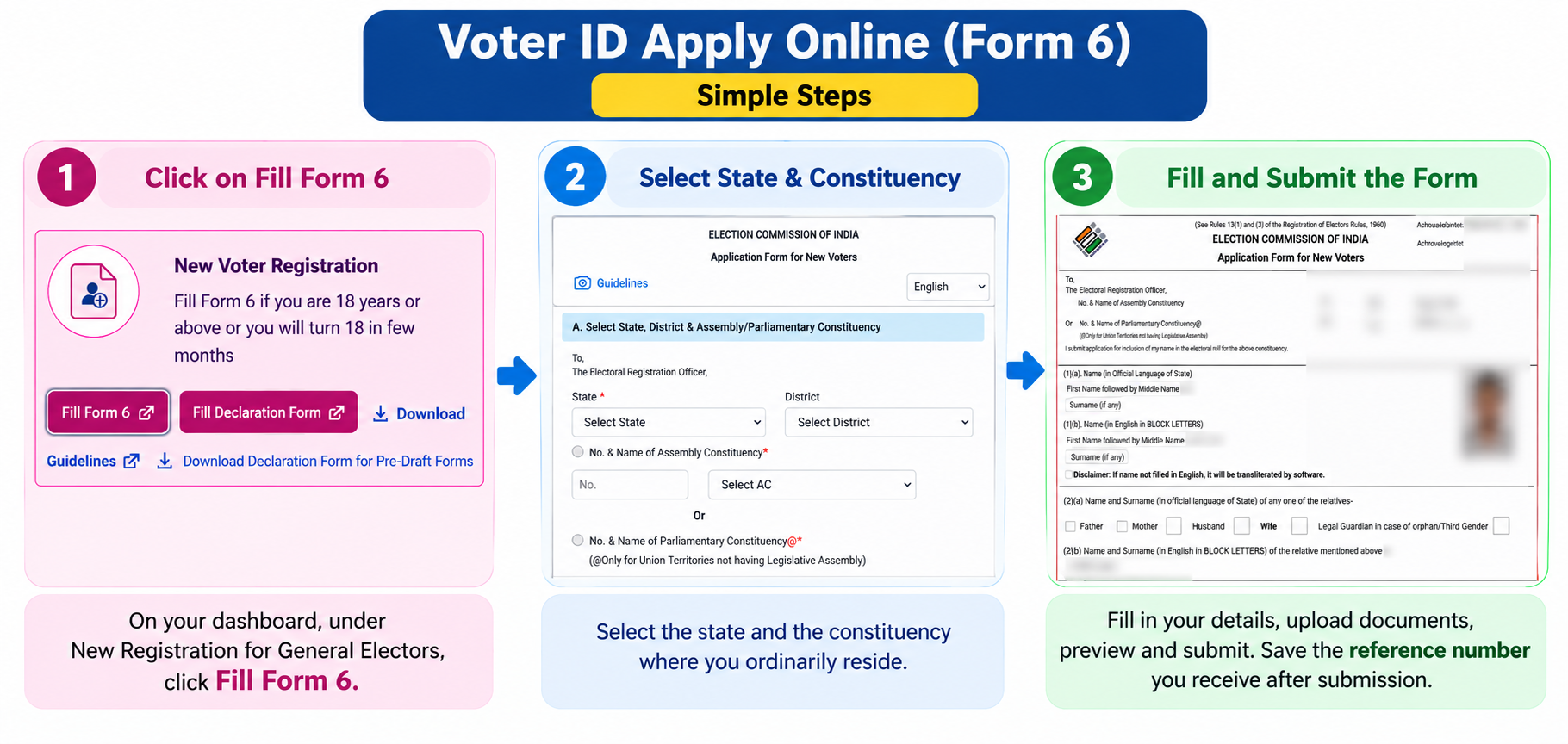
- On your dashboard, under New Registration for General Electors, click Fill Form 6.
- State & constituency: select the state and the constituency where you ordinarily reside (where you actually live, not a temporary stay).
- Personal details: enter your name carefully in English, and check the auto-transliteration into the state language for spelling errors, this is a frequent source of mistakes on the printed card.
- Age & DOB: enter your date of birth and upload the matching age proof.
- Relative’s details: add a family member’s name and relationship (father, mother, or spouse).
- Address: enter your current residential address and upload address proof.
- Photo: upload your passport-size photograph.
- Aadhaar (optional): enter it if you choose, or select the option to decline.
- Preview: click Preview & Submit and check every field, especially spelling, DOB, and address.
- Declaration & submit: fill the declaration (how long you’ve lived at the address), enter the captcha, and submit.
Step 3: The BLO Verification (Don’t Skip This Part)
Submitting Form 6 is only half the process. Your application then goes to the Electoral Registration Officer (ERO), who assigns a Booth Level Officer (BLO), a local government official, to verify you.
The BLO typically visits your address in person to confirm you actually live there. What this means for you:
- Keep your original documents handy at home during the weeks after applying.
- If you’re out when the BLO visits, they may revisit or call the mobile number you gave, so keep it reachable.
- Answer genuine verification, but never share a portal password or OTP with anyone claiming to be a BLO, real BLOs don’t need those.
Once the BLO confirms and the ERO approves, your name is added to the electoral roll and your EPIC is generated.
How Long It Takes
- Normal online application: roughly 15 to 30 days after BLO verification.
- During a special revision drive: often faster, around 7 to 15 days.
- During an election period: new registrations may be paused after the cut-off, so apply well before any election notification.
Once approved, you don’t have to wait for the posted card, you can download your e-EPIC immediately.
Common Reasons Applications Get Rejected
- Already registered: you’re already on the roll somewhere, apply for a transfer (Form 8), not a fresh Form 6.
- Name mismatch: the name on Form 6 doesn’t match your uploaded documents. Enter it exactly as on your proof.
- Unclear documents or photo: blurry scans or a photo with a busy background get bounced. Use clear, plain images.
- Address not verifiable: the BLO couldn’t confirm you live there. Make sure your address proof matches where you actually reside.
- Failed BLO verification: nobody available at the address across visits. Keep your mobile reachable so they can reach you.
If rejected, the portal shows the reason, read it, fix that specific issue, and reapply, rather than submitting the same form again.
Prefer to Apply Offline?
You don’t have to use the portal. You can collect a paper Form 6 from your local Electoral Registration Office (ERO), or download and print it from voters.eci.gov.in, fill it in, attach a photo and self-attested document copies, and submit it to your BLO or ERO. The verification and timeline are the same as online. Registration is free either way, no genuine channel charges for it.
Common Questions
Is there any fee to register as a voter?
No. New voter registration is completely free, online or offline. Anyone charging you to “get a voter ID” or to “speed it up” is not a genuine channel, all official services run through voters.eci.gov.in or the Voter Helpline app.
Is giving my Aadhaar on Form 6 mandatory?
No, it’s voluntary. Aadhaar is used only for identity matching and to prevent duplicate entries. If you prefer not to share it, you can complete Form 6 using any other accepted identity document instead.
My application has been pending for over a month, what should I do?
First check the status with your reference number. If it’s stuck beyond the usual window, call the voter helpline at 1950, contact your ERO/AERO, or lodge a complaint in the portal’s grievance section. A nearby CSC centre can also follow up with the BLO.
Can I apply if I’ve moved to a new city?
If you’ve never registered, use Form 6 for your current address. If you’re already registered at your old address, don’t file a fresh Form 6, use Form 8 to shift your registration, which moves your existing entry rather than creating a duplicate.
Need Help?
For registration queries or a stuck application, call the Election Commission’s national voter helpline at 1950, or use the grievance section on voters.eci.gov.in. For an overview of all voter services, see our Voter ID guides hub.