
How to Check Your Voter ID Application Status
Submitted Form 6, 7, or 8 and waiting? Track it in real time on the official portal or app with your Reference ID. This guide covers the exact steps, what each status actually means, what to do if it’s stuck, and how to track even if you’ve lost your reference number.

What You Need First
Tracking needs one thing: your Reference ID (also called the Acknowledgement Number). You got it three ways when you applied:
- On screen right after submitting the form.
- By SMS and email to your registered mobile.
- Printed on the acknowledgement slip, if you applied offline.
Lost it? Don’t worry, the section further down shows how to retrieve it by logging in. Tracking is free and works for Form 6 (new registration), Form 8 (correction/shifting), Form 7 (deletion), and Form 6A (NRI).
Method 1: Track on the Portal
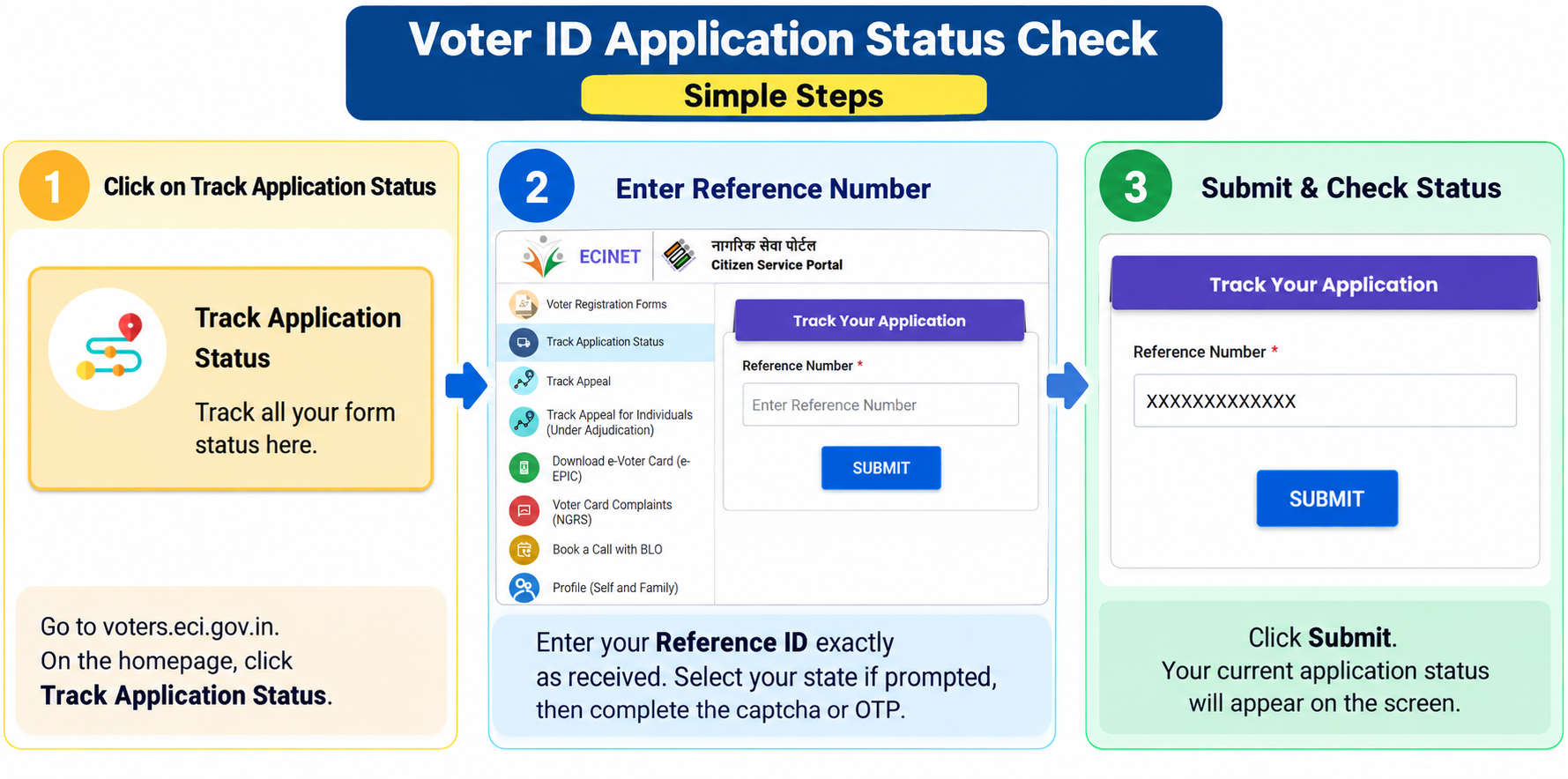
- Go to
voters.eci.gov.in. - Click Track Application Status on the homepage (in the services section).
- Enter your Reference ID exactly as received.
- Select your state if prompted, then complete the captcha or OTP.
- Click Submit, your current status appears on screen.
Method 2: Track on the Voter Helpline App
Often faster than the website during peak hours (near election deadlines).
- Open the official Voter Helpline app (Android or iOS).
- Tap Track Application Status (usually under Explore or the main menu).
- Enter your Reference ID.
- Tap Submit to see the current stage.
Method 3: No Internet? Use SMS or the Helpline
These work without a smartphone or data, but note the distinction:
- By phone (for a pending application): dial 1950 (add your STD code if needed), tell them your Reference ID, and they’ll read out the current status.
- By SMS (to confirm a name already on the roll): from your registered mobile, send
ECI <space> EPIC numberto 1950 (some states useEPIC <space> number). You get a reply with your voter details. Standard SMS charges apply.
The SMS route checks an existing EPIC on the electoral roll, it isn’t for tracking a fresh Form 6. For a new application, use the Reference ID by phone or on the portal.
What Each Status Actually Means
The exact wording can vary slightly by state and portal version, so read the live label on screen. Here’s what the common stages mean and what to do at each.
- Submitted / Received: the form reached the system. Nothing to do yet.
- Under Process / Forwarded to ERO: your application is with the Electoral Registration Officer for review. This is normal, wait for the next stage.
- Field Verification / BLO Appointed: a Booth Level Officer will verify you, usually within 2 to 3 weeks. Keep your original documents handy and your mobile reachable. This stage is where most applications sit the longest.
- Accepted / Approved: your name has been added to the electoral roll and your EPIC is generated. You can now download your e-EPIC.
- Rejected: the ERO found an issue. The status page shows the reason, read it carefully, fix that specific problem, and reapply (or file an appeal if the tile appears).
Lost Your Reference ID?
You can still find your application without it:
- Log in to
voters.eci.gov.inwith the mobile number you used to apply. - Open your profile or dashboard, all applications you’ve submitted are listed there, each with its Reference ID and current status.
Also check the SMS and email you received on the day you applied, the reference number is in that confirmation. If none of this works, call the voter helpline on 1950.
If Your Application Is Stuck
Most delays sit at the field-verification stage. If it hasn’t moved beyond the usual window (roughly 15 to 30 days, longer during a revision drive):
- Use Book a Call with BLO or Know your Booth on the portal to reach the officer handling your case.
- Call the voter helpline on 1950 with your reference ID ready.
- Lodge a complaint in the portal’s grievance section, or contact your ERO/AERO directly (they, not a private kiosk, decide roll inclusion).
- A nearby CSC centre can also follow up with the BLO on your behalf.
After Approval: Confirm Your Name on the Roll
Once accepted, do one final check, confirm your name actually appears on the electoral roll:
- Open Search in Electoral Roll on voters.eci.gov.in (or electoralsearch.eci.gov.in).
- Search by your EPIC number, or by name and personal details, or by registered mobile OTP.
- Your entry shows your polling station, part number, and serial number, useful to note before election day.
If you’re approved but not appearing yet, give it a little time to sync, then recheck. Still missing is a Form 6 or Form 8 matter to raise with your ERO.
Common Questions
Is checking my voter ID status free?
Yes, entirely free on voters.eci.gov.in and the Voter Helpline app. You only need your Reference ID. Any site or agent charging to “check” or “speed up” your status is not an official channel.
How long should tracking take to show a result after I apply?
The status usually appears within about 24 hours of submitting. Before that, it may not register yet, which isn’t a problem. From there it moves through verification over roughly 15 to 30 days, longer during a Special Intensive Revision.
My status says “rejected”, can I fix it?
Yes. The status page states the reason, commonly a document mismatch, an unclear photo, or failed field verification. Correct that specific issue and reapply with Form 6 (or the relevant form). If an “Appeal” option is shown for your case, you can use that instead.
Can I check status with just my mobile number, without a Reference ID?
Yes, indirectly. Log in to the portal with your registered mobile and your submitted applications, with their reference IDs and statuses, are listed under your profile. To confirm a name already on the roll, you can also use the Electoral Search by mobile OTP.
Need Help?
For a stuck or rejected application, call the Election Commission’s voter helpline at 1950, or use the grievance section on voters.eci.gov.in. New to the process? See our Voter ID application guide, or the full Voter ID hub.