
How to Correct or Update Your Voter ID (Form 8)
Wrong name, date of birth, photo, or address on your Voter ID? You don’t need a new card, one Form 8 fixes it, free and online. This guide covers exactly what can be corrected, the tick-box step everyone misses, documents, and how long it takes.

What Form 8 Can Fix
Form 8 is the single form for several things, all free:
- Correcting entries: name, gender, date of birth or age, relative’s name and relation type, address, mobile number, and photo.
- Shifting residence: moving your registration to a new address (within or outside your constituency).
- Replacing an EPIC: a fresh card if yours is lost, damaged, or defaced.
- Marking as PwD: flagging a Person with Disability for polling assistance.
You can correct up to four particulars in a single Form 8. For clarity, though, fixing one detail at a time can reduce the chance of a delay.
First: Correction or a New Constituency?
Not sure exactly what’s wrong on your record? It helps to download your electoral roll and see your current entry before you file, so you correct the right field.
Step-by-Step: Filing Form 8
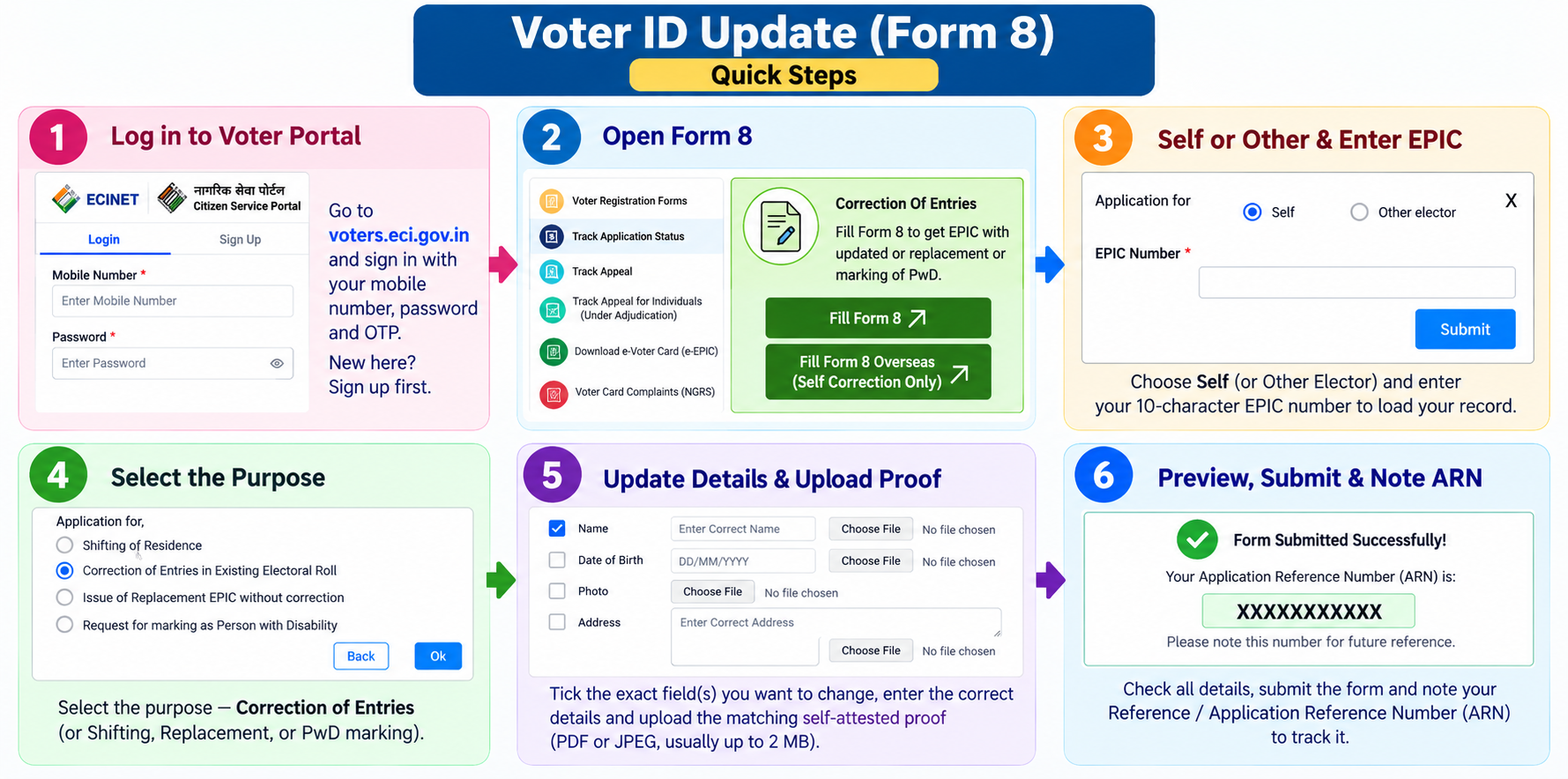
On the portal, Form 8 is split into five sections (A to E) you can jump between. Here’s what to do in each:
- Log in: go to
voters.eci.gov.inand sign in with your mobile number, password, and OTP (sign up first if you’re new). Open Correction of Entries / Shifting of Residence (Form 8) and choose Self, then enter your 10-character EPIC number to load your record. - A. Select State, District, AC/PC: confirm your state, district, and Assembly/Parliamentary Constituency.
- B. Details: this is where you make the actual change. Tick the checkbox next to each specific entry you’re correcting (Name, DOB, Photo, Address, etc.), then enter the correct value and upload the matching self-attested proof (PDF or JPEG, usually up to 2 MB). If you don’t tick a field’s box, it won’t be updated, even if you typed a new value.
- C. Submit application for: confirm the purpose, correction of entries, shifting of residence, replacement of EPIC, or PwD marking.
- D. Declaration: fill the declaration confirming the details are true (place and date).
- E. Submission: click Preview and Submit, review everything, and submit.
- Save your reference number (ARN): note it down to track your application.
Documents: One Proof Per Correction
Every correction needs one self-attested document that supports the new detail. Match the proof to what you’re changing:
- Name correction: Aadhaar, PAN, passport, or (for a name change after marriage) a marriage certificate.
- Date of birth: birth certificate, Class 10 marksheet, or passport.
- Address: Aadhaar with the new address, a recent utility bill, bank/post office passbook, or rent agreement.
- Photo: a recent passport-size colour photo (front face, plain background).
Lost or Damaged Card? Same Form
You don’t need a different process for a lost or damaged EPIC, Form 8 handles replacement too. Select the Replacement of EPIC option, confirm your details (no correction needed if nothing’s changed), and submit. Once approved, you can download a fresh e-EPIC immediately, and a reprinted physical card follows by post. Your EPIC number stays the same, only the card is reissued.
Verification & Timeline
After you submit, the application goes to your Booth Level Officer (BLO) and Electoral Registration Officer (ERO). For address and name changes, a BLO may verify in person or by phone, so keep your documents handy and your mobile reachable.
Corrections usually complete in about 15 to 30 days (sometimes up to 60 during busy periods). You can track the status with your reference number, and once approved, download the corrected e-EPIC.
Changing Your Name/Address After Marriage
This is one of the most common corrections, and there are a few things worth getting right:
- Update, don’t re-register. If you already have an EPIC, correct that record with Form 8. Filing a fresh Form 6 creates a duplicate entry, which causes verification problems.
- Do it in one application. If you’re changing both surname and address (moving to your spouse’s home), submit them together in a single “Shifting of Residence” Form 8, the system doesn’t allow multiple active Form 8s at once.
- Enter the new surname exactly as it appears on your marriage certificate, Aadhaar, or PAN, so the records stay consistent.
- If your address proof is in your spouse’s name (a bill or passbook), also upload your marriage certificate as relationship proof, submitting only the spouse’s document is a common cause of rejection at BLO verification.
Prefer to Do It Offline?
You can also submit a paper Form 8. Collect it from your Electoral Registration Office (ERO), or download and print it from voters.eci.gov.in, tick the fields you’re correcting, attach a passport-size photo and self-attested proof copies, and hand it to your BLO or ERO. During special revision drives, BLOs also collect these forms door to door. The verification and timeline are the same as online, and it’s free.
Common Questions
Does correcting my Voter ID cost anything?
No. All corrections, replacements, and address changes through Form 8 are completely free, online or at an office. Anyone charging you to “correct” your voter ID is not an official channel.
Does my EPIC number change after a correction?
No. Your EPIC number is permanent. A correction only updates the details on and linked to your record, the number and your position on the roll stay the same.
Can I fix more than one detail at once?
Yes, a single Form 8 allows up to four particulars to be corrected. That said, correcting one at a time can be cleaner and reduce the risk of a delay if one document has an issue.
My correction was rejected, what now?
The status page shows the reason, usually a document mismatch, a blurry upload, or an unticked field box. Fix that specific issue and refile Form 8. Make sure the proof exactly matches the new detail and that you’ve ticked the correct field.
Need Help?
For a stuck or rejected correction, call the Election Commission’s voter helpline at 1950, or use the grievance section on voters.eci.gov.in. For all voter services, see our Voter ID hub.