
How to Track Your PAN Card Application Status Online
Applied for a new PAN or a correction? You can track it online about 24 hours after submission, using your acknowledgement number, or even without it. Here’s every method on both Protean and UTIITSL.

What You’ll Need
The reference number depends on where you applied:
- Protean (NSDL): your 15-digit Acknowledgement Number.
- UTIITSL: your Coupon/Application Number, or just your PAN number with date of birth.
- Lost your reference number? Protean also lets you track by name and date of birth, covered at the end of this guide.
Note: status usually appears about 24 hours after you apply. Checking sooner may show “no record found” simply because the system hasn’t updated yet.
Tracking on Protean (NSDL)
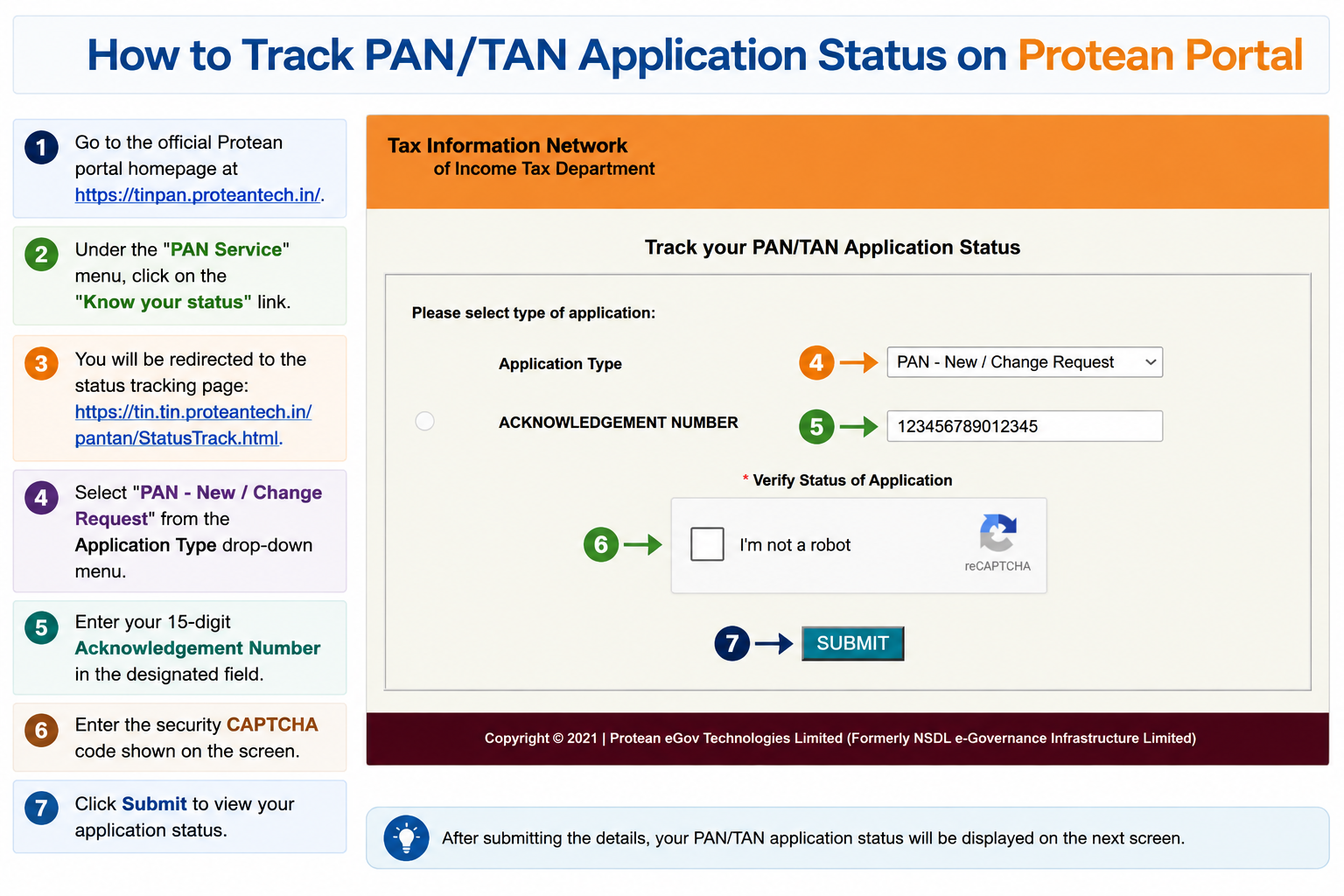
- Go to the Protean status page,
tin.tin.proteantech.in(or open Know your status under the PAN Service menu ontinpan.proteantech.in). - Select PAN – New / Change Request from the Application Type drop-down.
- Enter your 15-digit Acknowledgement Number.
- Enter the captcha and click Submit.
Tracking on UTIITSL
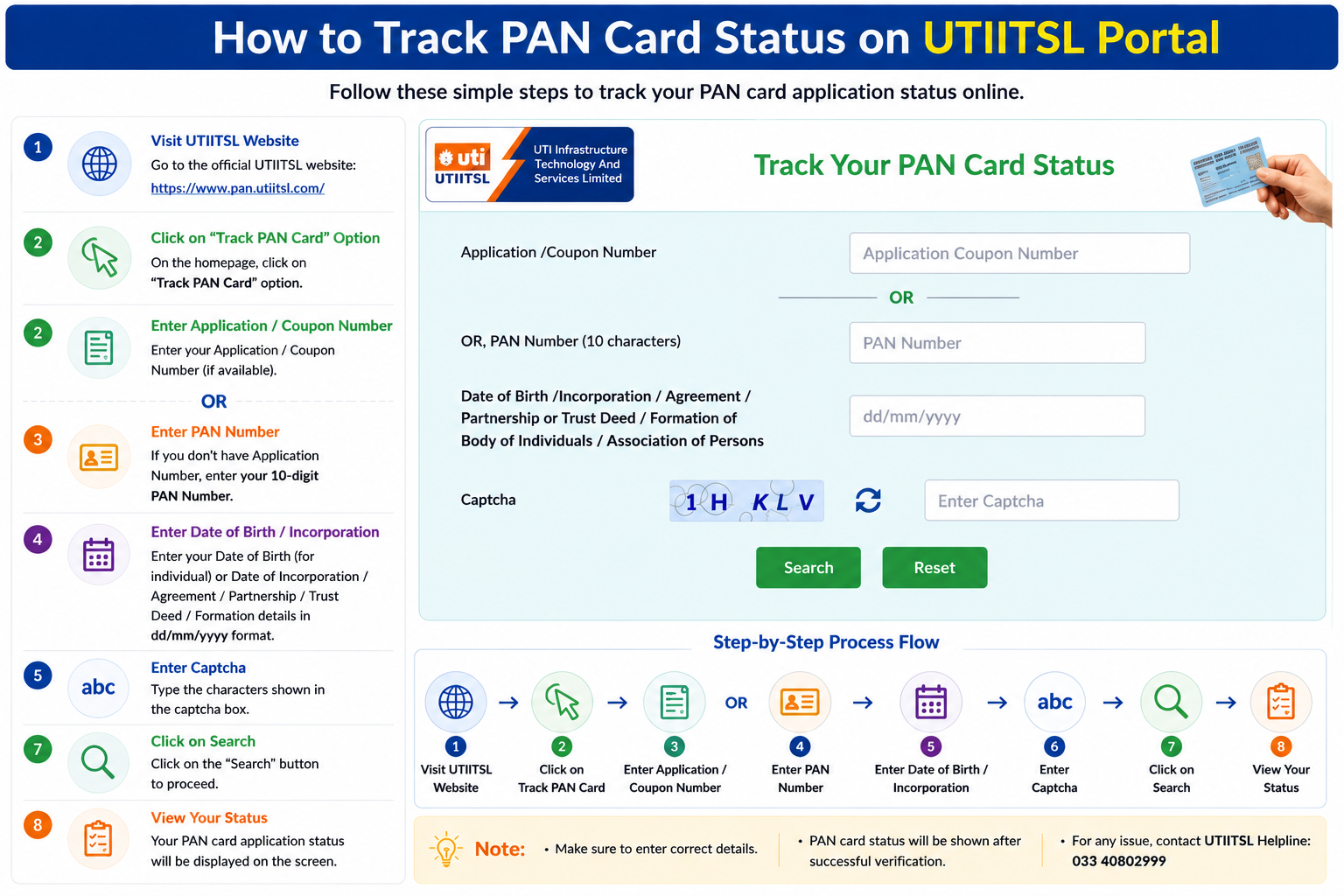
- Go to
trackpan.utiitsl.com, or click Track PAN Card onpan.utiitsl.com. - Enter your Application/Coupon Number, or your 10-character PAN number.
- Enter your Date of Birth (or Date of Incorporation for non-individuals).
- Enter the captcha and click Submit.
Lost Your Acknowledgement Number?
You can still track a Protean application without it:
- On the Protean status page, choose PAN – New / Change Request as the Application Type.
- Select the Name option instead of Acknowledgement Number.
- Enter your Last Name, First Name, Middle Name, and Date of Birth exactly as given in the application.
- Submit to see your status.
Prefer the phone? Call Protean’s TIN line at 020 27218080 with your details ready, or send an SMS in the format NSDLPAN <15-digit acknowledgement number> to 57575.
What the Status Messages Mean
- No record found / Invalid details: either a wrong number, or the system hasn’t updated yet. Recheck your receipt and retry in 24 to 48 hours.
- Under process / Application inward: it’s actively being reviewed, nothing to do but wait.
- Application withheld: paused over missing info or an unclear document scan. Follow the on-screen instructions to fix the issue.
- PAN allotted and dispatched: approved and in transit. Use the tracking number on India Post to follow delivery, and you can download your e-PAN right away instead of waiting for the card.
Common Questions
How soon after applying can I check my status?
Give it about 24 hours. Before that, the tracking system often hasn’t registered your application yet and may show “no record found” even though everything is fine.
My status has said “under process” for weeks, is that normal?
A new PAN is usually processed within a couple of weeks, but verification can take longer. If it’s stretched well beyond that, call the provider (Protean 020 27218080, or UTIITSL 033 40802999) with your reference number to have it checked.
Do I have to wait for the physical card to use my PAN?
No. Once the status shows “allotted”, your PAN is active. You can download the e-PAN immediately, it’s fully valid, while the physical card arrives separately by post.
Can I check the status of an instant e-PAN here?
No, that’s a different route. An instant e-PAN generated via Aadhaar is tracked on the Income Tax e-Filing portal instead, see our instant e-PAN guide for that method.
Can’t Track It?
Protean (TIN) Support
Phone: 020 27218080
Email: tininfo@proteantech.in
UTIITSL Support
Phone: 033 40802999
Email: utiitsl.gsd@utiitsl.com