
How to Get an Instant e-PAN via Aadhaar
The Income Tax Department lets you generate a PAN for free using your Aadhaar, entirely online, usually in about 10 minutes. Here is who is eligible, the step-by-step process, and how to download your e-PAN.

Who Can Use This (and Who Can’t)
Instant e-PAN is free, paperless, and issues a digitally signed PAN using your Aadhaar, but it’s meant only for a specific group. You’re eligible if all of these are true:
- You’re an individual who has never been allotted a PAN before (this is not for reprints or corrections).
- Your Aadhaar is linked to an active mobile number for the OTP.
- You are not a minor on the date of the request.
- You are not a Representative Assessee under the Income Tax Act.
Step-by-Step: Generating Your e-PAN
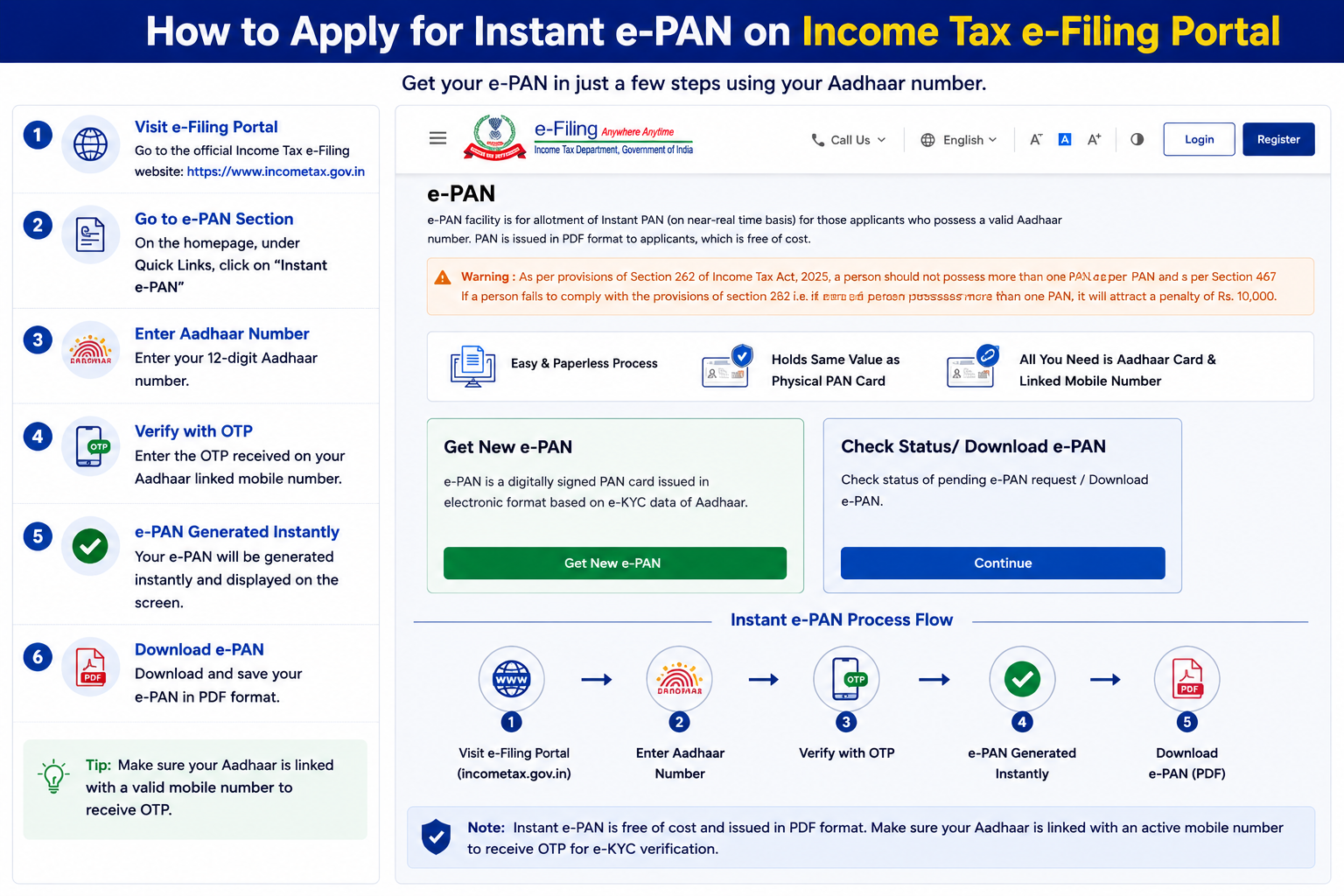
No forms, no uploads, it runs entirely on Aadhaar OTP.
- Open the portal: go to
incometax.gov.inand, under Quick Links, click Instant e-PAN. - Start: click Get New e-PAN.
- Enter Aadhaar: type your 12-digit Aadhaar number, tick the confirmation box, and click Continue.
- Give consent: read and accept the consent terms, then Continue.
- Verify OTP: enter the OTP sent to your Aadhaar-linked mobile, tick the box to validate your details with UIDAI, and Continue.
- Done: an Acknowledgement ID appears and a confirmation goes to your mobile. Note this ID, you’ll use it to track and download.
Checking Status & Downloading
Your e-PAN is usually ready within about 10 minutes. To track or download it:
- Back on the e-Filing portal, click Instant e-PAN again.
- Open Check Status / Download e-PAN.
- Enter your 12-digit Aadhaar number and Continue.
- Verify with the OTP sent to your mobile.
- See your request status, or download the digitally signed e-PAN once allotted.
Opening Your e-PAN PDF
The downloaded e-PAN is a password-protected PDF (this applies whether you get it here or from Protean/UTIITSL).
DDMMYYYY format, no spaces, slashes, or other characters.
| Date of Birth | PDF Password |
|---|---|
| 7 April 1992 | 07041992 |
| 16 June 1991 | 16061991 |
Note the leading zeros, 7 April is 0704, not 74.
Want a Physical Card Too?
Your instant e-PAN is legally valid on its own and accepted everywhere a PAN is needed. If you also want the plastic card, request a reprint, it doesn’t change your number, just prints a copy.
- Where: through the Protean (formerly NSDL) portal. See our PAN reprint guide for the full process.
- What you’ll need: your PAN, Aadhaar, and date of birth.
- Fee: about ₹50 (incl. taxes) for delivery within India; about ₹959 for a foreign address.
- Delivery: mailed to the communication address on file with the Income Tax Department.
Common Questions
Is the instant e-PAN really free?
Yes, generating an instant e-PAN via Aadhaar on the Income Tax portal is completely free. There’s no fee at any step. A charge only applies if you later request a physical reprint or download an e-PAN from Protean/UTIITSL after their free window.
Is an instant e-PAN valid for bank accounts, KYC, and ITR?
Yes. It’s digitally signed and holds the exact same legal status as a physical PAN card. It’s accepted for opening bank accounts, KYC, filing returns, and every other purpose a PAN is used for.
What if my Aadhaar isn’t linked to a mobile number?
You can’t use instant e-PAN, since the whole process relies on an OTP to your Aadhaar-linked mobile. You’d first need to update your mobile number on Aadhaar, or apply through the regular Protean/UTIITSL route instead.
How long is it valid, and do I need to renew it?
A PAN never expires and never needs renewal. Once allotted, your number is permanent for life, the e-PAN PDF you download is simply a copy of it you can re-download any time.
Trouble With the Portal?
For issues specific to instant e-PAN or the e-Filing portal, the Income Tax Department’s helpline is 1800 103 0025. For anything Aadhaar-side (like OTP not arriving), UIDAI’s 1947 can help.