
How to Download Your e-PAN Card Online (Protean & UTIITSL)
An e-PAN holds the same legal validity as a physical card and is ready in minutes. Download it from the official portal where your latest PAN application was processed, here’s how to do it on both.

First: Which Portal Is Yours?
Your e-PAN can only be downloaded from the provider that processed your PAN, so check this before you start:
- Look at your existing PAN card, the back usually shows whether it was issued by Protean (NSDL) or UTIITSL.
- Applied via Aadhaar on the Income Tax portal? Then it’s an instant e-PAN, download it free from there instead, covered in our instant e-PAN guide.
- If one portal says “record not found,” try the other, your PAN may be registered there.
Free Window & Charges
- Free for 30 days: both Protean and UTIITSL let you download your e-PAN free if it’s within 30 days of the PAN being allotted or a change/correction being confirmed by the Income Tax Department. Within this window you can download it up to three times.
- After 30 days: a nominal ₹8.26 (incl. taxes) applies per download on both portals.
Downloading via Protean (formerly NSDL)
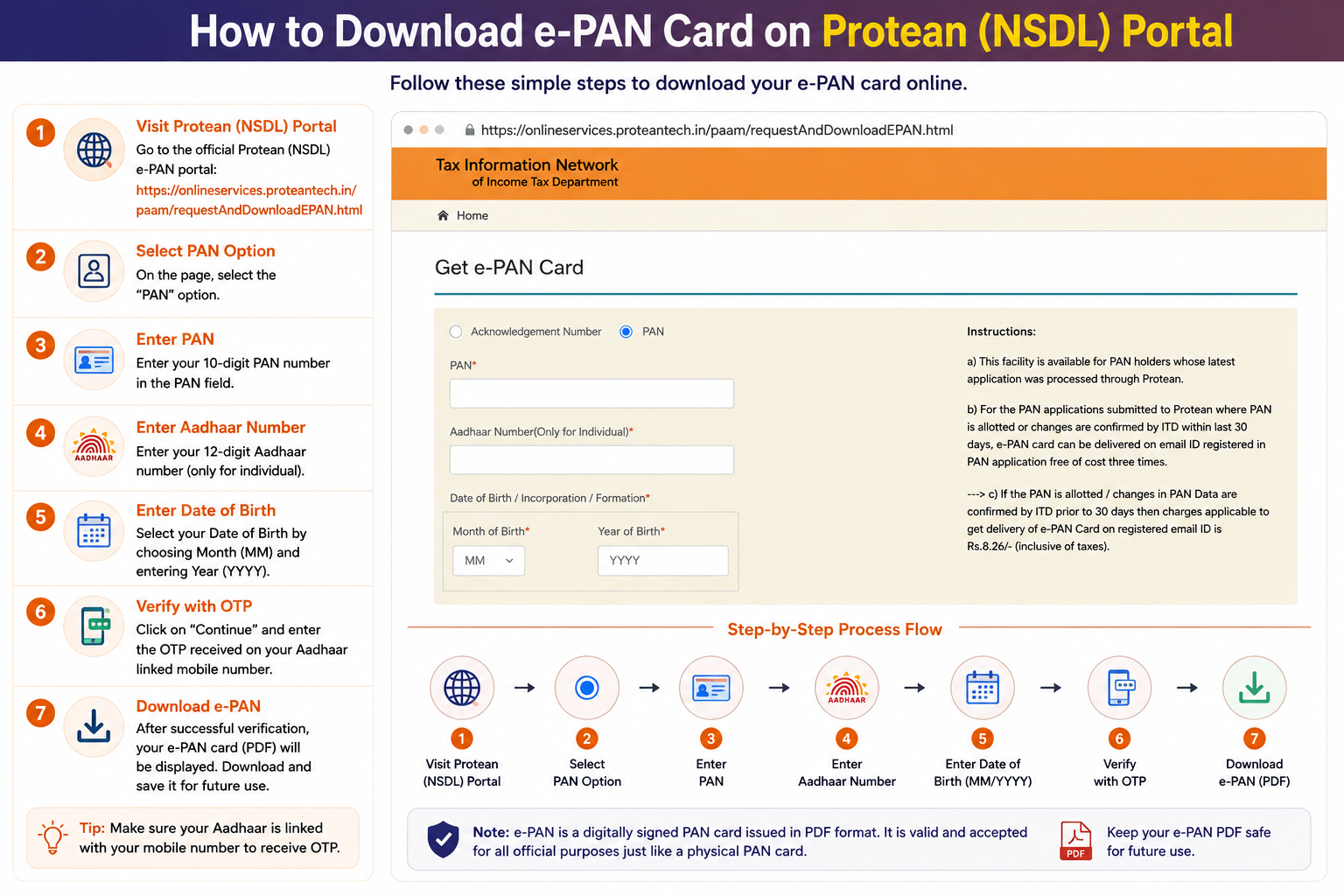
If your latest PAN application or correction went through Protean, use their official e-PAN download page at onlineservices.proteantech.in.
Option A: Using the Acknowledgement Number
Best if you applied recently and don’t have your PAN card yet
- On the Protean e-PAN download page, select the Acknowledgement Number option.
- Enter the 15-digit Acknowledgement Number from your application.
- Enter your Date of Birth in
DD/MM/YYYYformat. - Enter the captcha and click Submit.
- Choose to receive the OTP on your registered mobile or email, verify it, and download the PDF.
Option B: Using Your PAN Number
Use this if you already have your PAN and just need a digital copy
- Select the PAN option on the same page.
- Enter your 10-character PAN number.
- Enter your Aadhaar number (mandatory for individuals).
- Enter your Date of Birth in
DD/MM/YYYYformat. - Tick the consent box, enter the captcha, and click Submit.
- Complete OTP verification to download your e-PAN.
Downloading via UTIITSL
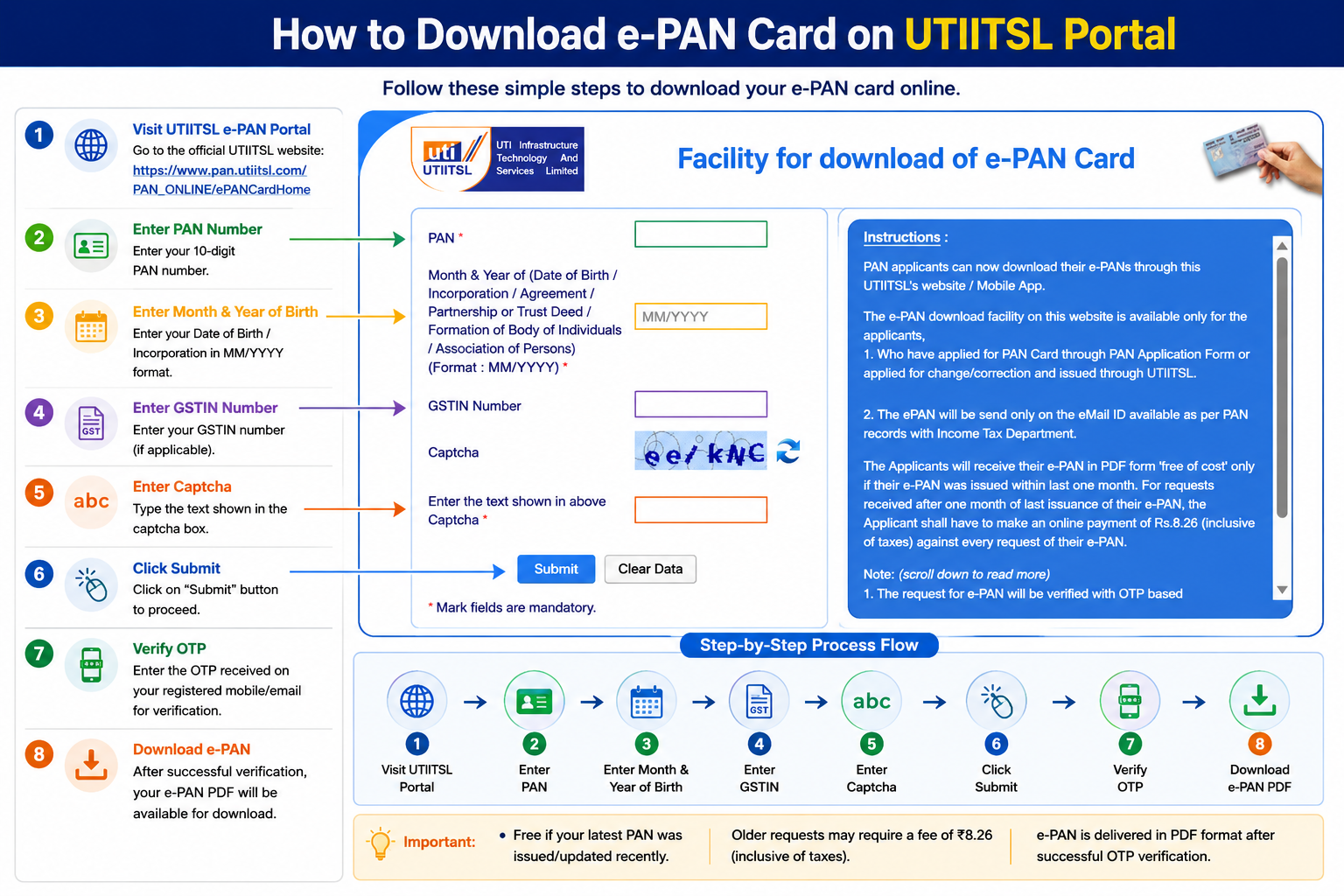
If UTIITSL handled your latest application or correction, use their download facility at pan.utiitsl.com. The e-PAN link is sent to the email ID in the Income Tax records.
- Open the UTIITSL Download e-PAN facility.
- Enter your 10-character PAN number.
- Enter your Date of Birth in
DD/MM/YYYYformat. - Enter GSTIN only if applicable (individuals leave it blank).
- Enter the captcha and click Submit.
- Authenticate with the OTP sent to your registered mobile or email.
- Download the PDF (after paying ₹8.26 if you’re past the 30-day free window).
Opening Your e-PAN PDF
DDMMYYYY format, no slashes or spaces. For 15 January 1990, it’s 15011990. (Note: the download form uses DD/MM/YYYY with slashes, but the PDF password has no slashes.)
Common Questions
My mobile number isn’t registered, can I still download?
No. Every download needs an OTP to your registered mobile or email. If neither is current, you’ll first have to update your contact details, which for PAN means filing a correction request to add a working mobile or email.
Is the downloaded e-PAN valid, or do I need the physical card?
The e-PAN is fully valid and digitally signed, accepted for KYC, bank accounts, and ITR just like the plastic card. You only need a physical reprint if a specific office insists on a hard copy.
The portal says “record not found”, what now?
It usually means your PAN was processed by the other provider. If Protean can’t find it, try UTIITSL, and vice versa. If both fail, double-check your PAN/acknowledgement number and date of birth for a typo.
Why is my download being charged when I applied recently?
The free window is 30 days from allotment or from a confirmed correction, not from when you first got the card years ago. If your last activity was over 30 days back, the ₹8.26 fee applies.
Download Not Working?
Protean (TIN) Support
Phone: 020 27218080
Email: tininfo@proteantech.in
UTIITSL Support
Phone: 033 40802999
Email: utiitsl.gsd@utiitsl.com