
How to Apply for Changes or Corrections in Your PAN Card
A wrong letter in your name or a mistyped date of birth can quietly break ITR e-verification and bank KYC. Here’s how to correct or update your PAN details online, step by step, with the current 2026 forms and fees.

Before You Pay: Some Changes Are Free
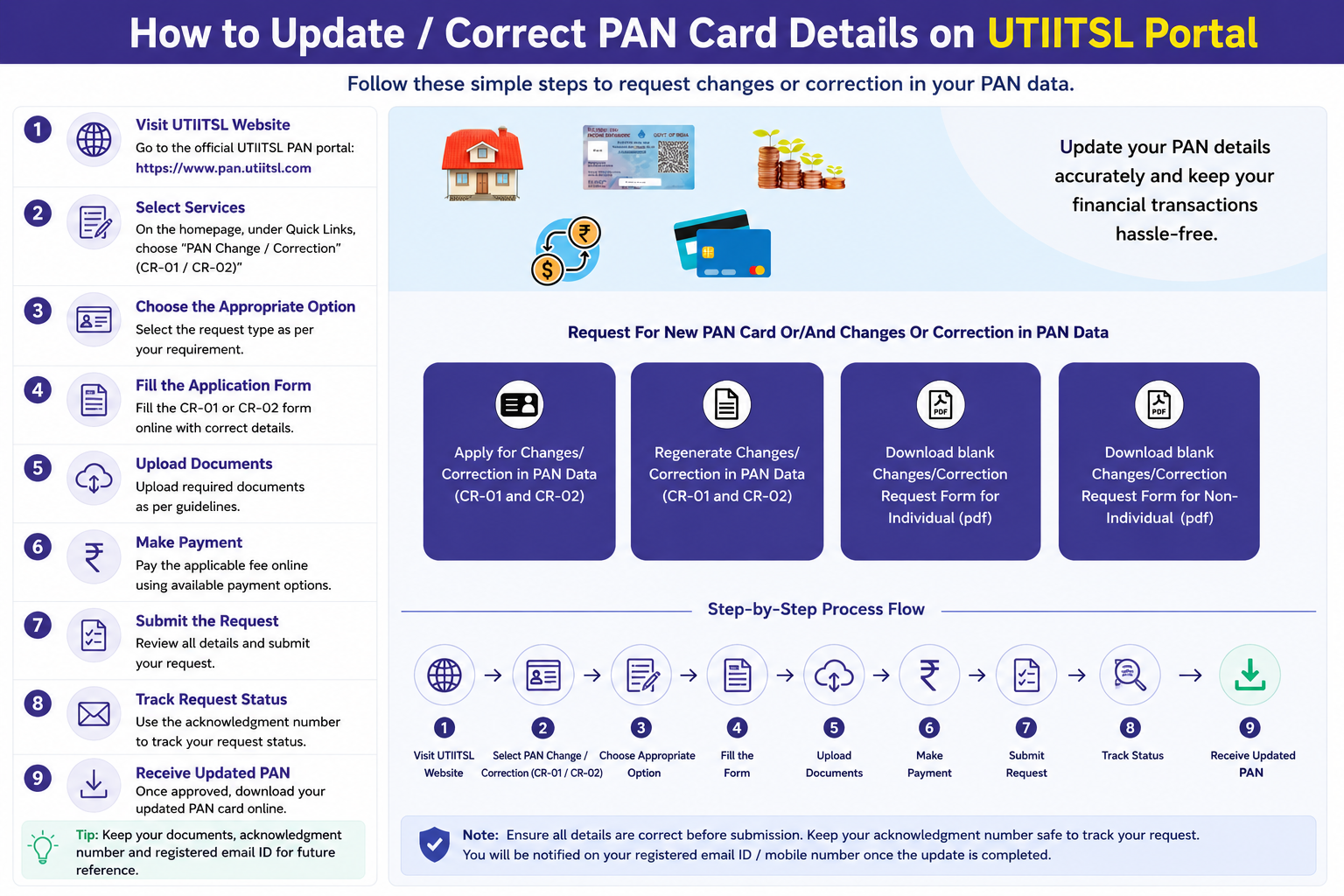
Starting Your Correction Request
Since 1 April 2026, corrections use standardised forms, PAN CR-01 for individuals and PAN CR-02 for non-individuals such as companies and firms. You file either through Protean or UTIITSL; both are official and cost the same. This guide uses UTIITSL as the example.
- Open the portal: go to
pan.utiitsl.comand find the Change/Correction in PAN Card block, then click Click To Apply. - Pick the right option on the request page:
- Apply for Changes/Correction in PAN Data, to start a fresh correction or reprint request.
- Regenerate Changes/Correction, only if you started earlier and want to resume an incomplete application.
Filling the Form Correctly
Want only a reprint with no changes? Fill in your current details exactly as they are and leave all the correction boxes unticked, you’ll get a fresh card with the same information.
Verification & Documents
Paperless route (recommended)
If your Aadhaar is linked to your mobile, use Aadhaar e-KYC and e-Sign. The portal pulls your details from UIDAI, so no manual uploads are needed, and nothing has to be posted.
Standard route
If you’re not using e-KYC, or you’re changing your name after marriage or a legal change, upload scanned Proof of Identity, Proof of Address, Proof of Date of Birth, a copy of your existing PAN, and the relevant proof of the change (such as a marriage certificate or gazette notification for a name change).
Fees (Inclusive of GST)
Pay by Net Banking, Debit/Credit Card, or UPI. The fee depends on whether you want a physical card and where it’s delivered, not on what you’re correcting.
| Type | Physical Docs | Paperless e-KYC |
|---|---|---|
| Physical card + e-PAN (India) | ₹107 | ₹101 |
| Physical card + e-PAN (foreign) | ₹1,017 | ₹1,011 |
| e-PAN only (no physical card) | ₹72 | ₹66 |
Submit & Track
After payment and Aadhaar authentication (if used), submit the form. You’ll get a 15-digit acknowledgement number, save it to track your correction status. The corrected e-PAN is usually ready in about 2 to 3 working days, and the physical card arrives in roughly 15 to 20 days.
Common Questions
Will my PAN number change after a correction?
No. The 10-character PAN number is permanent for life. A correction only updates the details printed on and linked to the card, like your name or date of birth, never the number itself.
Do name or date-of-birth corrections cost more?
No. The fee is the same regardless of what you change, it depends only on whether you want a physical card and the delivery address. However, name and DOB changes need stronger supporting proof, so mismatched documents are the main cause of rejection.
Protean or UTIITSL, which should I use for corrections?
Either works, both are official and charge the same. If your PAN was originally issued through one of them, using the same provider can make verification smoother, but it isn’t required.
Can I correct my PAN without any physical paperwork?
Yes. With Aadhaar-based e-KYC and e-Sign, the whole correction is done online, nothing is printed or posted. You only need the standard-route document uploads if you skip e-KYC or your change needs extra proof.
Need Help With Your Request?
Protean (TIN) Support
Phone: 020 27218080
Email: tininfo@proteantech.in
UTIITSL Support
Phone: 033 40802999
Email: utiitsl.gsd@utiitsl.com