
How to Reprint Your PAN Card (Protean & UTIITSL)
Lost, damaged, or worn-out PAN card? Order a physical duplicate with the exact same details from Protean or UTIITSL. Your PAN number stays the same, only a fresh card is printed and posted.

First: Reprint or Correction?
Reprint Fees
Fees are the same on both Protean and UTIITSL, and depend only on the delivery address.
| Dispatch Address | Fee (incl. taxes) |
|---|---|
| Within India | ₹50 |
| Outside India | ₹959 |
Reprint via Protean (NSDL)
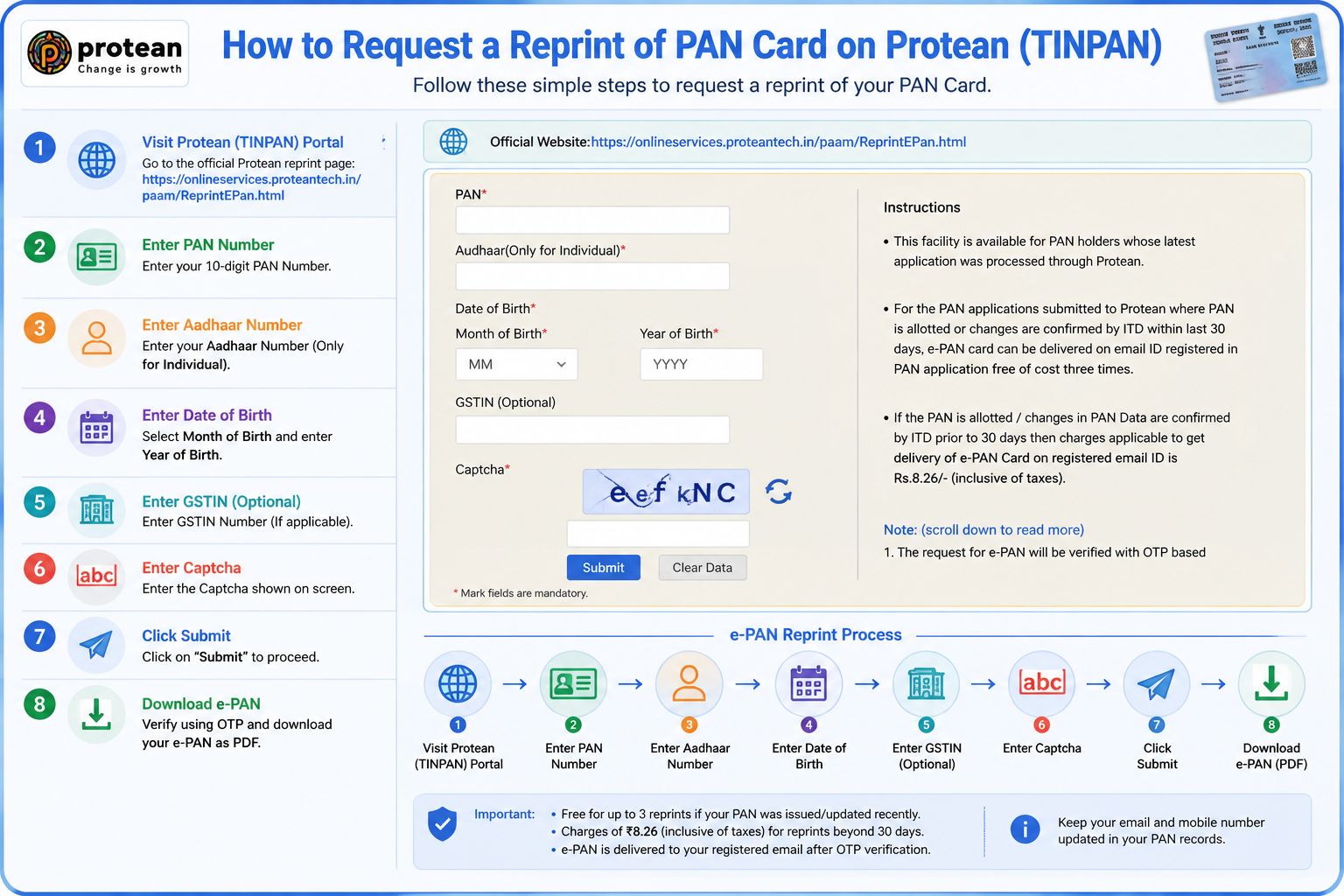
Use this if your latest PAN application was processed by Protean, or you obtained your PAN through the Income Tax instant e-PAN facility. Official page: onlineservices.proteantech.in.
- Open the reprint page on Protean and go to the Reprint of PAN Card section.
- Enter details: your PAN number, Aadhaar number (mandatory for individuals), and Date of Birth in
DD/MM/YYYYformat. - Consent & captcha: accept the Aadhaar e-KYC consent, enter the captcha, and click Submit.
- Confirm contact: check that the registered mobile and email shown are correct (this is where your OTP and card go).
- Verify OTP: enter the OTP sent to your registered mobile or email.
- Pay: ₹50 for an Indian address via card, net banking, or UPI, no document upload needed.
- Save the acknowledgement: a 15-digit number is generated, use it to track dispatch.
Reprint via UTIITSL
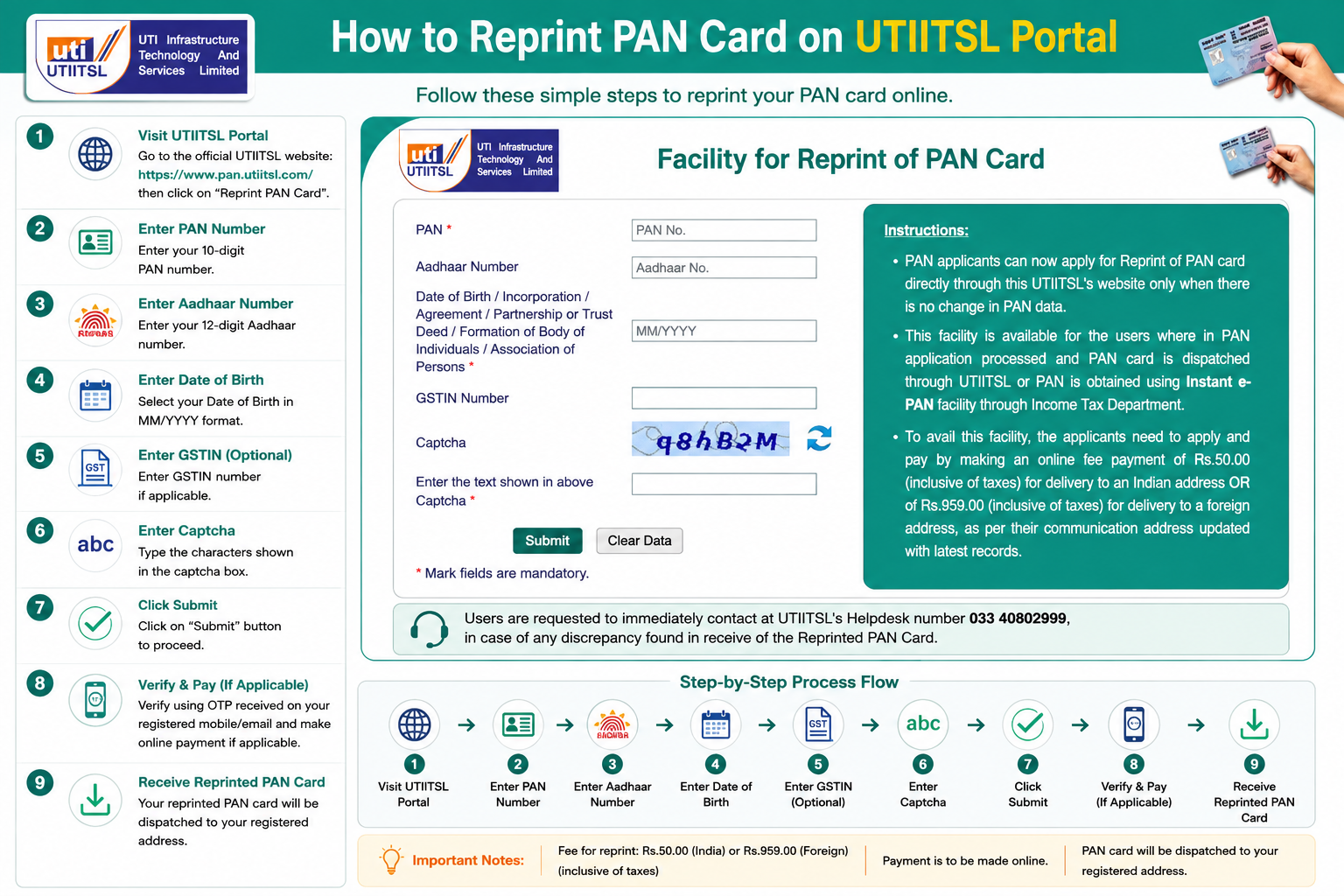
Use this if UTIITSL processed your latest application. Official page: pan.utiitsl.com.
- Open the Reprint PAN Card service on UTIITSL.
- Enter details: your PAN number, Aadhaar number (recommended for verification), and Date of Birth in
DD/MM/YYYYformat. - Captcha & submit: enter the captcha and click Submit.
- Verify OTP sent to your registered contact.
- Pay the ₹50 fee online.
- Dispatch: the card is printed and posted to the communication address on your Income Tax records.
Want the Newer QR-Code Card?
Under the Income Tax Department’s PAN 2.0 initiative, newer PAN cards carry a QR code that lets banks and offices verify details instantly. If your card was issued before this and has no QR code, you don’t need a new PAN, a standard reprint at the same ₹50 fee generates the updated QR-code card, since your number and data stay unchanged.
Only worth doing if you actually need it, an older card without a QR code is still fully valid.
Common Questions
Does my PAN number change when I reprint?
No. The 10-character PAN number is permanent for life. A reprint simply prints a fresh physical card with the same number and details already on record, nothing changes.
How long does the reprinted card take to arrive?
Typically 15 to 20 working days via India Post Speed Post, to the address on your PAN record. If you need proof sooner, download your e-PAN, it’s valid immediately while the physical card is in transit.
I lost my PAN and don’t remember the number, can I still reprint?
You need the PAN number to reprint. If you’ve lost it, first recover it using the “Know Your PAN” facility on the Income Tax portal (with your name, DOB, and registered mobile), then come back and request the reprint.
Can I change my photo or signature during a reprint?
No. A reprint reuses the photo and signature already in the database. To change either, you must file a PAN correction request instead, which does allow updating the photo, signature, and other details.
Trouble With Your Reprint?
Protean (TIN) Support
Phone: 020 27218080
Email: tininfo@proteantech.in
UTIITSL Support
Phone: 033 40802999
Email: utiitsl.gsd@utiitsl.com