
How to Apply for a PAN Card via Protean & UTIITSL
Apply for a new PAN online through the two providers authorised by the Income Tax Department: Protean (formerly NSDL eGov) and UTIITSL. This guide covers the new 2026 forms, documents, fees, and how to track it.

First: The New PAN Forms (from 1 April 2026)
Pick the form that matches who you are, the portals will guide you to the right one, but it helps to know in advance:
- Form 93: Indian citizens who are individuals, including minors and NRIs with Indian citizenship.
- Form 94: Indian non-individual entities, companies, HUFs, firms, and trusts.
- Form 95: foreign individual citizens (OCI / PIO / foreign nationals).
- Form 96: foreign non-individual entities.
What Else Changed in 2026
- Mobile number is now mandatory for every applicant, individual and non-individual.
- Larger photo size: passport-style photos must now be 5 cm x 3.5 cm, older sizes get rejected at scanning.
- Aadhaar no longer counts as date-of-birth proof. You’ll need a separate DOB document such as a birth certificate, passport, or matriculation certificate (details below).
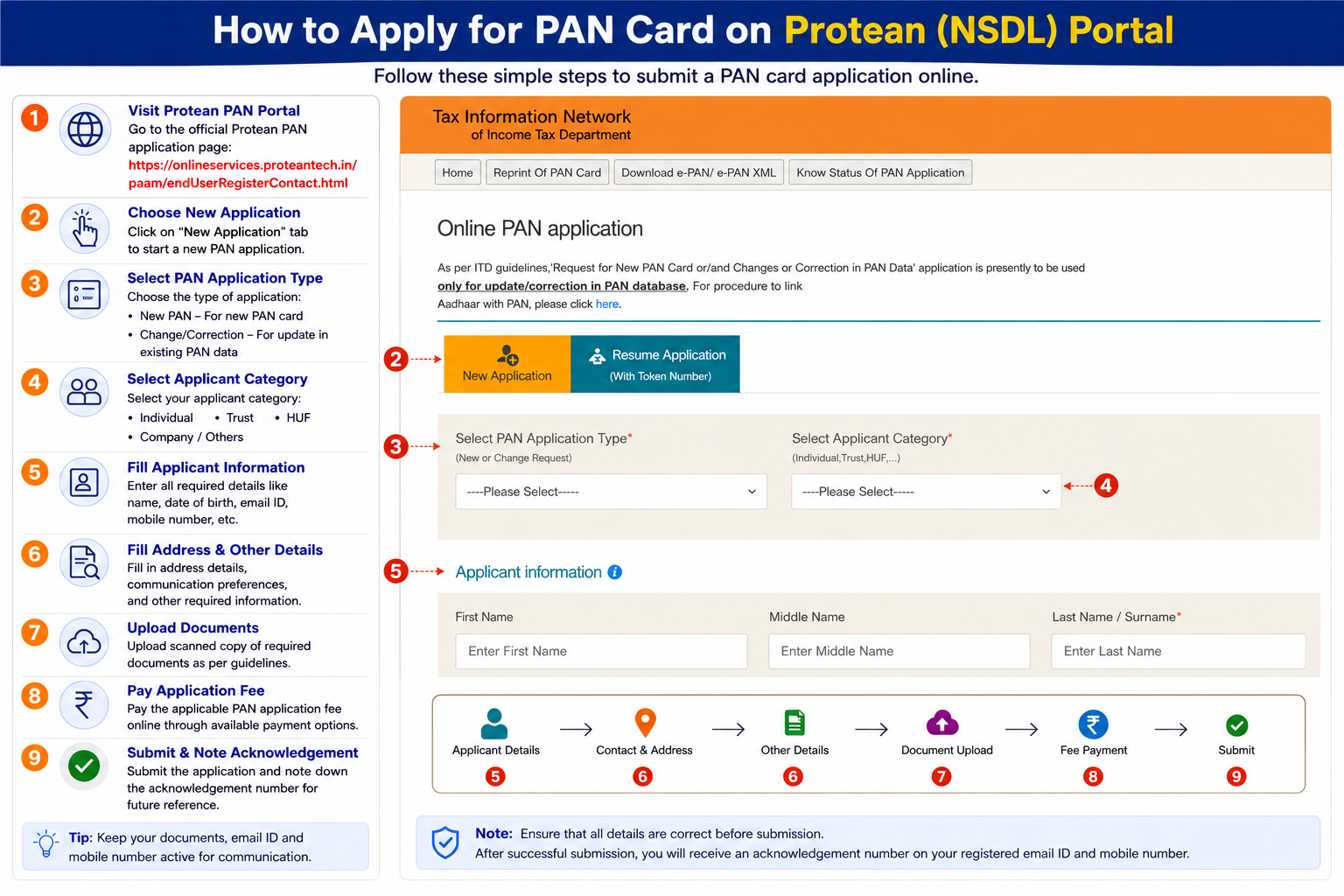
Applying via the Protean (TIN-NSDL) Portal
The online process on Protean uses the new forms based on your applicant category.
- Open the portal: go to Protean’s PAN services at
onlineservices.proteantech.in. - Select form & category: choose the correct new form for your type, such as Form 93 for an individual Indian citizen.
- Register: enter your name, date of birth, email, and mobile number, tick the consent box, and submit.
- Note your token: a unique Token Number is emailed to you. Click Continue with PAN Application Form.
- Pick a submission mode:
- Paperless (e-KYC & e-Sign): Aadhaar OTP does everything digitally, fastest option.
- Scanned images (e-Sign): upload photo, signature, and document proofs.
- Physical: print the form and post it with your documents.
- Fill in details: parents’ names, source of income, address, and your Assessing Officer (AO) code, which the portal can auto-select from your location.
- Pay the fee: around ₹107 (incl. GST) for an Indian address; higher for foreign addresses. Pay by net banking, card, or UPI.
- Authenticate & submit: finish with Aadhaar e-KYC or e-Sign via OTP. Your application is then submitted.
Applying via the UTIITSL Portal
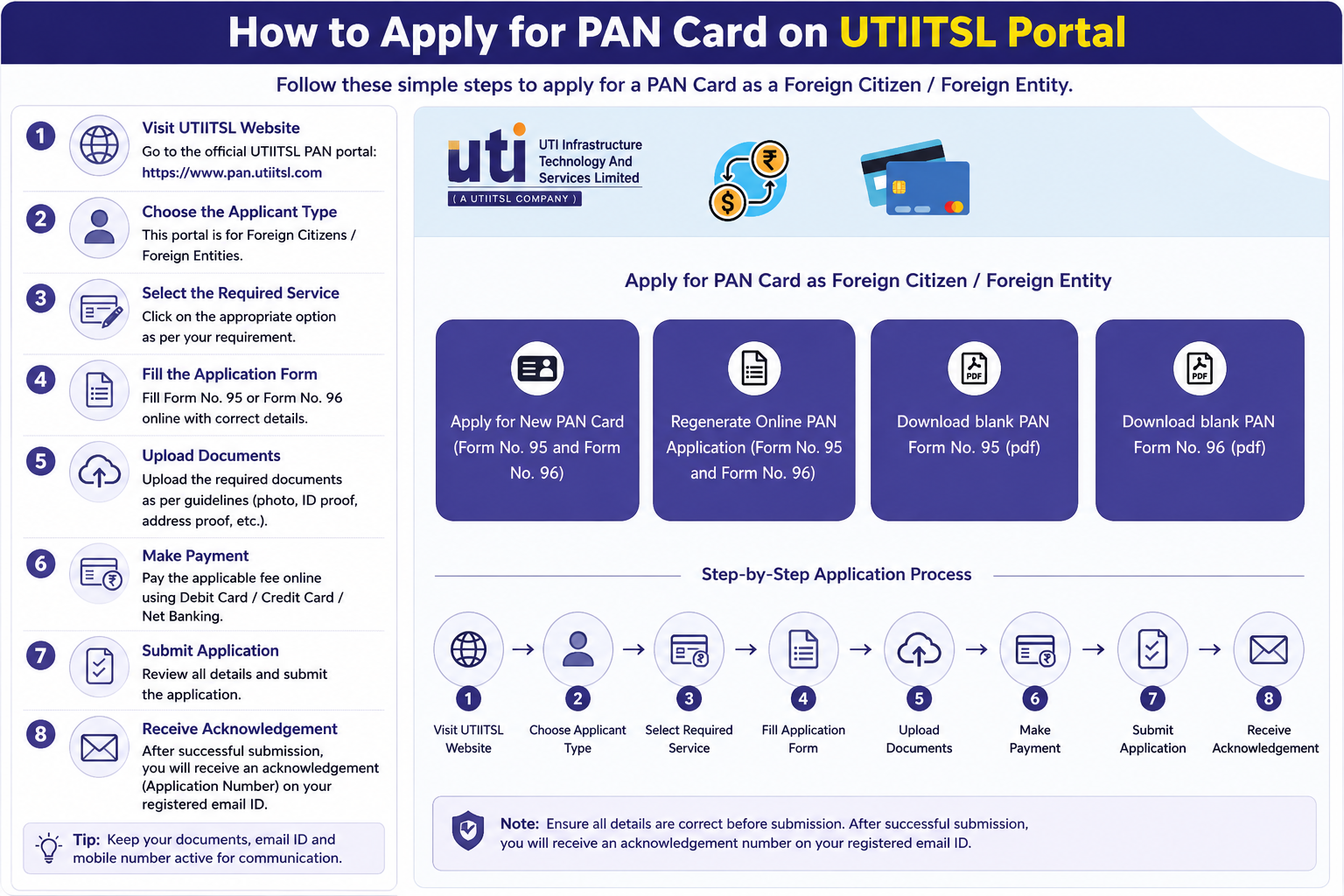
UTIITSL is the second official government-authorised portal, use whichever you prefer; both issue the same PAN.
- Open the portal: go to
pan.utiitsl.com. - Start a new application: in PAN services, click Apply for New PAN Card.
- Choose mode: Physical (paper/courier) or Digital (paperless via Aadhaar e-KYC/e-Sign).
- Fill the form: personal info, contact details, category, and address.
- Upload or authenticate: attach scanned photo, signature, and proofs, or authenticate directly via Aadhaar OTP.
- Pay: complete the fee online through the secure gateway.
- Save the acknowledgment: download the PDF receipt with your reference number for tracking.
Just Want a Digital PAN Fast & Free?
If you only need a digital PAN and have an Aadhaar linked to an active mobile, you can skip both portals and get an instant e-PAN via Aadhaar from the Income Tax e-Filing portal, free, and usually within about 10 minutes. The Protean/UTIITSL routes above are what you need if you want a physical card or are applying as an entity.
Documents You’ll Need (Individuals)
Proof of Identity (any one)
- Aadhaar Card
- Voter ID Card
- Indian Passport
- Driving Licence
- Photo ID card issued by a Central or State Government
Proof of Address (any one)
- Aadhaar Card, Voter ID, Passport, or Driving Licence
- Electricity, landline, or broadband bill, not older than 3 months
- Bank statement or post office passbook
- Registered rent agreement
Proof of Date of Birth (any one)
Note: since April 2026, Aadhaar is no longer accepted as DOB proof, use one of these:
- Birth certificate
- Matriculation certificate or mark sheet from a recognised board
- Passport
- A government-issued photo ID that carries your date of birth
Tracking Your Application
After submitting, use the reference number on your acknowledgment to track progress. For full detail, see our PAN status check guide.
Via Protean (TIN-NSDL)
- Online: on
the Protean track-status page, choose “PAN-New/Change Request”, enter your 15-digit Acknowledgement Number, and submit. - SMS: send
NSDLPAN <15-digit acknowledgement number>to 57575.
Via UTIITSL
- Online: on
the UTIITSL tracking page, select the application type, enter your Coupon Number, and submit.
Common Questions
Do I need a new PAN because of the 2026 form change?
No. If you already have a PAN, it stays valid, the number never changes. The new Forms 93 to 96 only apply when applying for a brand-new PAN on or after 1 April 2026.
Protean or UTIITSL, does it matter which I choose?
No. Both are official and issue the exact same PAN at the same fee. Pick either. If you only want a free digital PAN, the instant e-PAN route via Aadhaar is faster than both.
How long does a new PAN take?
A paperless Aadhaar e-KYC application is typically processed in a few working days, with the physical card dispatched within about 15 working days. Instant e-PAN via Aadhaar is issued in minutes.
Can a minor get a PAN?
Yes. A PAN can be issued to a minor using Form 93, with a parent or guardian’s details and documents. The minor’s photo and signature aren’t printed until they turn 18 and apply for an updated card.
Need to Reach the Providers?
Protean (TIN) Support
Phone: 020 27218080
Hours: 7:00 AM to 11:00 PM, all days
Email: tininfo@proteantech.in
UTIITSL Support
Phone: 033 40802999
Email: utiitsl.gsd@utiitsl.com