
How to Link Your PAN and Aadhaar & Check the Status
Under Section 139AA of the Income Tax Act, linking your PAN with Aadhaar is mandatory for most PAN holders. An unlinked PAN is treated as “inoperative”, which blocks refunds and transactions and triggers higher TDS/TCS rates until you fix it.

Where Things Stand Now
Who Doesn’t Need to Link
Linking is mandatory for individuals allotted a PAN on or before 1 July 2017. For new PAN applicants it happens automatically during the application. You’re exempt if you are:
- A resident of Assam, Jammu & Kashmir, or Meghalaya.
- A Non-Resident (NRI) under the Income Tax Act.
- Aged 80 or above at any time during the previous financial year.
- Not a citizen of India.
If you fall in an exempt category, an unlinked PAN is not treated as inoperative for you.
Step 1: Pay the ₹1,000 Fee
The late fee must be paid and processed before the linking request will go through.
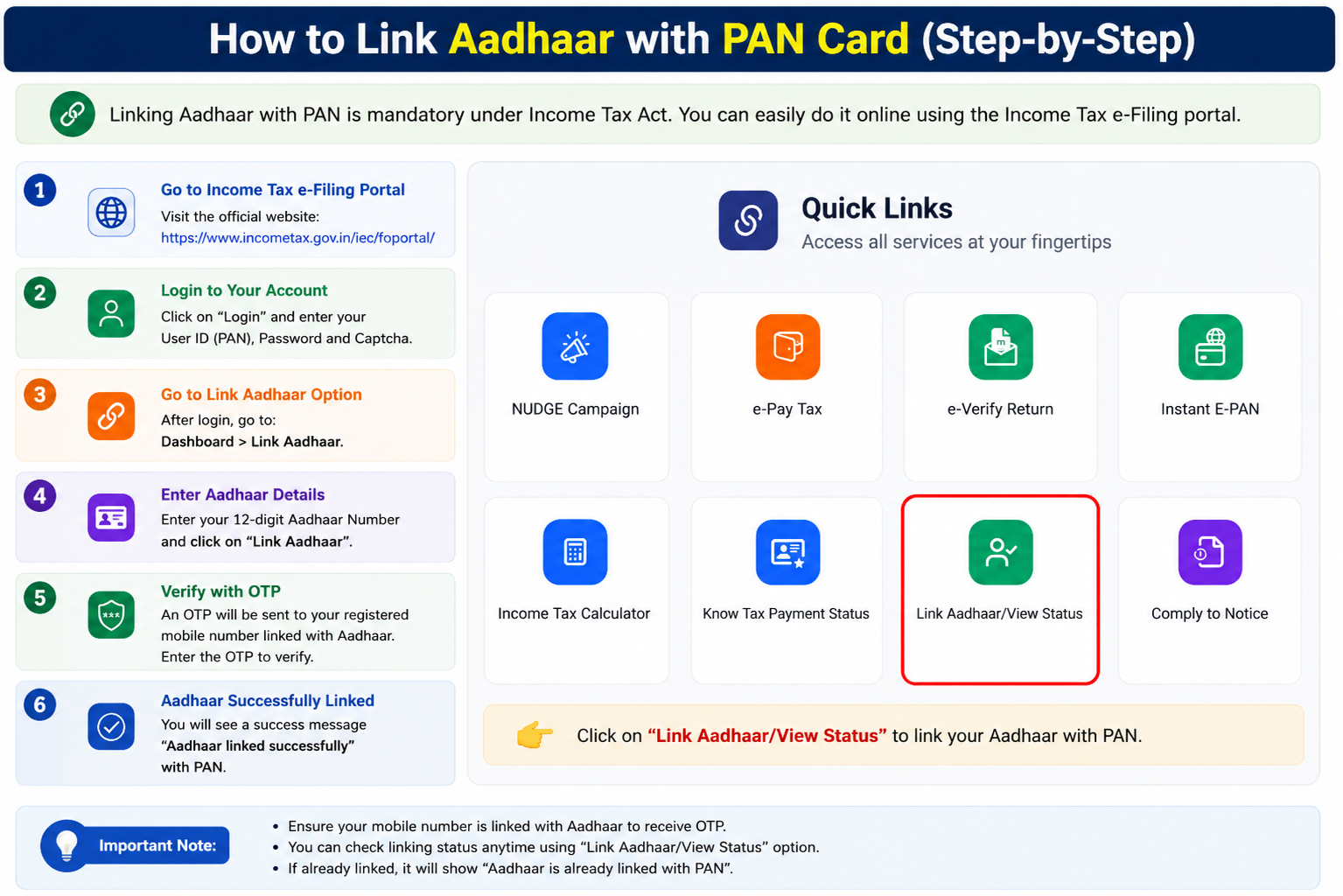
- Open the portal: go to
incometax.gov.inand click Link Aadhaar under Quick Links. - Enter details: your PAN and Aadhaar number.
- Start payment: click Continue to Pay Through e-Pay Tax.
- Verify: enter your PAN again to confirm and a mobile number for the OTP.
- Generate challan: proceed on the Income Tax tile, pick the relevant Assessment Year, and select Other Receipts (500) as the payment type (Major Head 0021). The ₹1,000 amount pre-fills.
- Pay: choose your payment mode and complete it.
Step 2: Submit the Link Request
- Return to
incometax.gov.inand click Link Aadhaar again (or find it in your Profile after logging in). - Enter your PAN and Aadhaar.
- The system detects your paid fee. Fill any prompted details and click Link Aadhaar.
- Enter the OTP sent to your registered mobile and click Validate.
- A success message confirms your request is submitted.
How to Check Your Link Status
You can confirm the linkage any time, do this first before paying, in case you’re already linked.
- Go to
incometax.gov.inand click Link Aadhaar Status under Quick Links. - Enter your PAN and Aadhaar number and submit.
- The screen shows one of the outcomes below.
“Aadhaar is linked with PAN”, you’re fully compliant, nothing to do.
“Aadhaar is not linked with PAN”, complete the fee and linking steps above.
“Aadhaar is linked to some other PAN”, a discrepancy to resolve with the Income Tax Department.
Common Questions
My PAN is already inoperative, can I still fix it?
Yes. Being inoperative isn’t permanent. Pay the ₹1,000 fee and submit the link request, your PAN generally becomes operative again within about 30 days. Avoid high-value transactions until it does, since an inoperative PAN won’t be accepted for verification.
Why is my linking failing even after paying?
Two common reasons: the payment hasn’t reflected yet (wait 4 to 5 working days after paying), or your name, date of birth, or gender don’t match exactly between PAN and Aadhaar. Fix any mismatch through a PAN correction or an Aadhaar update first, then retry.
What actually breaks if my PAN stays inoperative?
You can’t file or verify income tax returns, pending refunds are withheld, TDS/TCS is deducted at higher rates, and banks, demat, and mutual fund transactions can be blocked. It quietly disrupts most of your financial life, which is why linking is worth doing promptly.
Do I need to pay the ₹1,000 fee if I’m exempt?
No. If you’re in an exempt category (listed above), you don’t need to link and there’s no fee, your PAN isn’t treated as inoperative. The fee applies only to those who were required to link and missed the deadline.
Need Help?
PAN-Aadhaar linking is handled by the Income Tax Department, not Protean or UTIITSL. For issues with the e-Filing portal or a stuck payment, the Income Tax helpline is 1800 103 0025. For name/DOB mismatches on the Aadhaar side, UIDAI’s 1947 can help.