
Complete Guide to Locking and Unlocking Your Aadhaar
Protect your Aadhaar from unauthorised authentication. There are two different lock features, this guide explains both, which one you probably want, and exactly how to use each through official UIDAI channels.

Two Locks, Two Purposes
Before you lock anything, it’s important to know these are two separate features, people often confuse them:
Biometric Lock
Freezes only your fingerprints and iris. OTP, demographic checks, and your VID keep working. This is the everyday choice, it stops AEPS cash-point and SIM-shop fingerprint misuse without freezing your whole identity. You can turn it on with just your Aadhaar number and an OTP.
UID Lock
The stricter option. It makes your Aadhaar completely dormant, no authentication of any kind (biometric, OTP, or demographic) works, even via VID. You need a 16-digit VID to unlock it later. Use this only when you want your Aadhaar fully inactive for a while.
What You’ll Need
- An active registered mobile number, an OTP is mandatory for either lock. No registered number means you must update your mobile at a centre first.
- For UID Lock only, a 16-digit Virtual ID (VID), so your raw Aadhaar number is never exposed during the process. (Biometric Lock doesn’t need a VID.)
How to Lock & Unlock Biometrics (Recommended)
Go to
myaadhaar.uidai.gov.in(or the Aadhaar app) and open Lock/Unlock Biometrics.Tick the consent box, enter your 12-digit Aadhaar number and the captcha, then request an OTP.
Enter the OTP and confirm Lock. You get an on-screen and SMS confirmation.
From then on, any fingerprint or iris attempt against your Aadhaar fails (devices show error 330).
When you genuinely need a fingerprint scan, open the same service and choose Unlock. Biometrics unlock temporarily and re-lock automatically after use or a short time, so you don’t have to remember to re-lock.
For UID Lock: Get Your Virtual ID First
UID Lock needs a 16-digit VID. If you don’t have your current one, generate or retrieve it instantly:
- Generate via SMS: text
GVIDthen the last 4 digits of your Aadhaar to 1947 from your registered mobile, for exampleGVID 1234. - Retrieve a forgotten VID: text
RVIDthen the last 4 digits of your Aadhaar to 1947, for exampleRVID 1234. - Online: log in to the myAadhaar portal and use the VID Generator service.
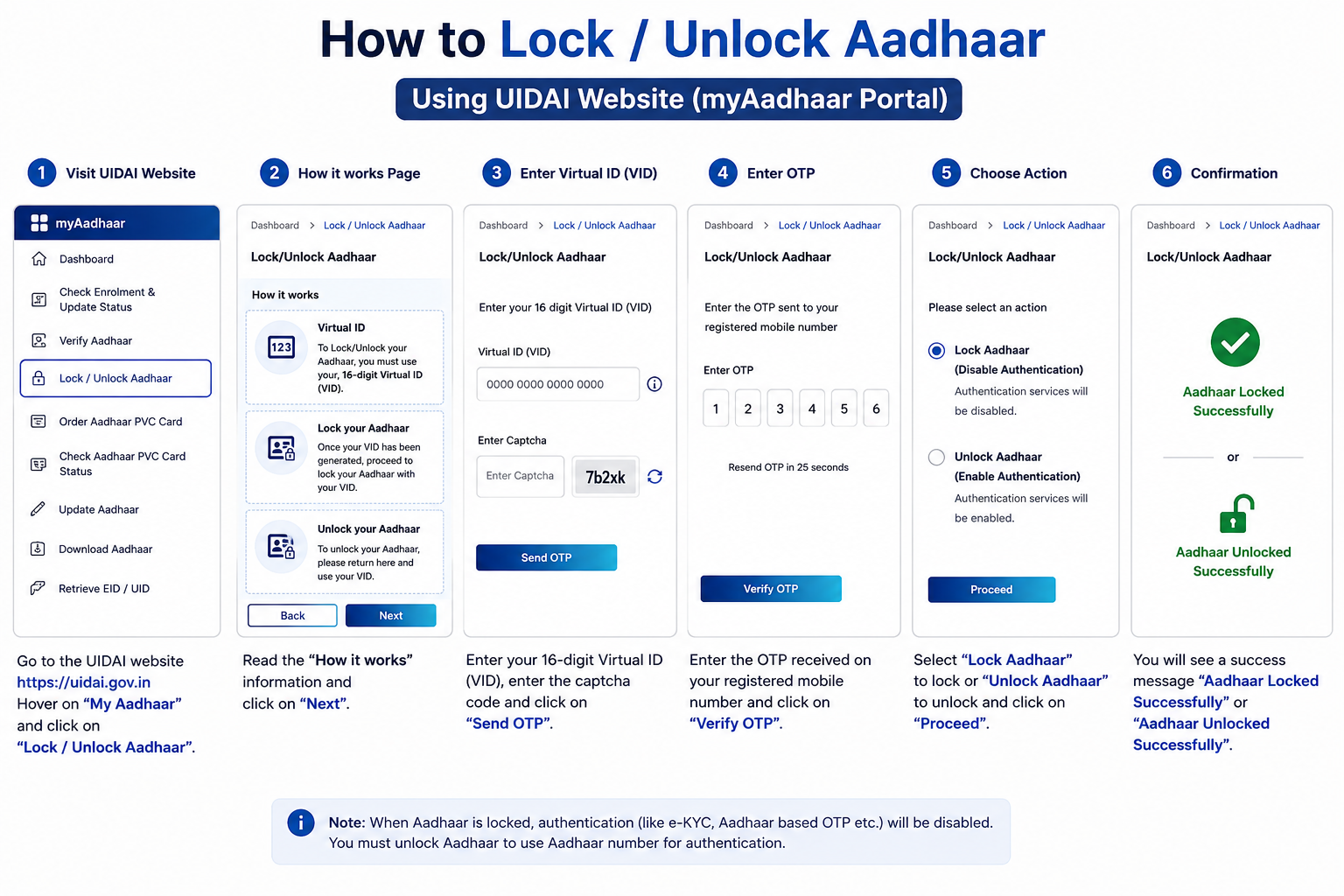
How to Lock & Unlock Your UID
To lock
Open the
Lock/Unlock Aadhaarservice on the portal and choose Lock.Enter your 16-digit VID, full name, and PIN code exactly as per your latest Aadhaar, plus the captcha.
Click Send OTP, enter the code from your registered mobile, and submit.
Your UID is now locked, every authentication route is blocked until you unlock it.
To unlock
Open the same Lock/Unlock service and choose Unlock.
Enter your latest 16-digit VID and the captcha.
Verify with the OTP sent to your registered mobile and submit, full access is restored instantly.
RVID SMS above, you’ll need it to unlock. Keep your registered mobile active, since every unlock needs an OTP.
Common Questions
Will locking my Aadhaar affect my linked bank account or subsidies?
Biometric Lock won’t, OTP and demographic authentication still work, so services that don’t need your fingerprint keep functioning. A full UID Lock, however, blocks all authentication, so any service that verifies against your Aadhaar will fail until you unlock. Choose based on what you need running.
Do I have to remember to unlock my biometrics after using them?
No. A temporary unlock re-locks automatically after a successful authentication or a short time window. You only manually intervene if you want to disable the biometric lock feature entirely.
Is the lock/unlock service free?
Yes, completely free, online, through the app, or by SMS. There is no fee and no centre visit needed, as long as your mobile number is registered for the OTP.
Locked Out or Stuck?
If an unlock won’t go through or you can’t retrieve your VID, UIDAI’s helpline 1947 is available 24/7. All official portals and contacts are on our quick reference page, and our UIDAI guide covers the helpline, Aadhaar Seva Kendras and regional offices. To see where your Aadhaar has been used before you decide what to lock, read our authentication history guide.