
How to Apply for a Fresh Indian Passport Online
Applying for your first passport through Passport Seva is more straightforward than it looks. This guide covers the exact online steps, the documents you’ll need, how payment and appointment booking work, and what happens at the Passport Seva Kendra.

Before You Start
- This guide is for a fresh passport, meaning you’ve never held an Indian passport. Already have one that’s expiring or needs changes? Use the reissue guide instead.
- You can choose any PSK across India, regardless of your registered address, so you’re not tied to your home city for the appointment.
- You’ll pay the fee before booking an appointment, payment is now mandatory to get a slot.
- Keep your documents ready (listed below), you carry the originals to the appointment.
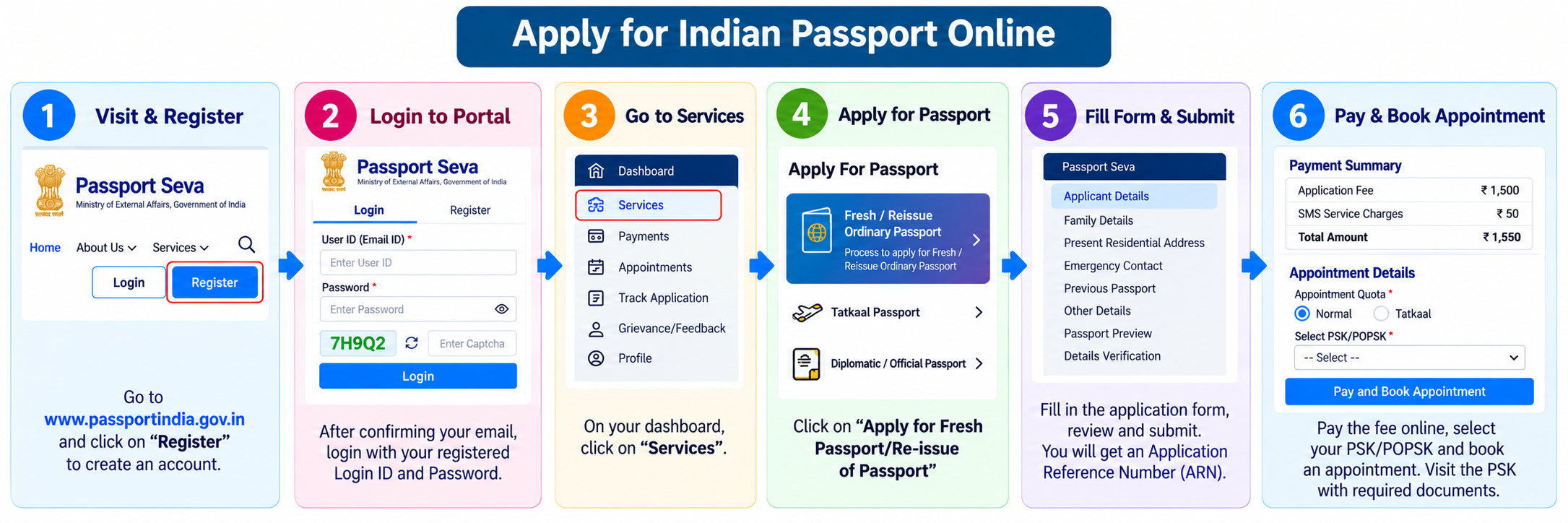
Step 1: Register & Log In
- Go to
passportindia.gov.inand click Register in the top menu. - Select your Passport Office (RPO) based on where you currently live, this decides which PSKs appear when you book. Fill in your name, date of birth, email, and a login ID, then click Sign Up.
- Confirm your registered email ID through the link sent to you.
- Return to the portal and Login with your login ID and password.
Step 2: Fill the Application Form
From your dashboard, click Services, then the “Apply for Fresh Passport / Re-issue of Passport” card. The form runs in nine short sections:
- Passport Type, choose Fresh, booklet size (36 or 60 pages), and validity.
- Applicant Details, name, DOB, birth place, and your ECR/Non-ECR eligibility.
- Family Details, parents’ (and spouse’s, if any) names.
- Address Details, your present residential address (this is where police verification happens).
- Emergency Contact, someone reachable if needed.
- Previous Passport, for a fresh application, you declare you’ve never held one.
- Other Details, criminal/citizenship declarations.
- Passport Preview, review everything carefully.
- Details Verification, confirm and submit.
Step 3: Pay the Fee & Book Your Appointment
- After submitting, click View Saved/Submitted Applications, then Pay and Schedule Appointment.
- Choose Online Payment, then select the appointment quota, Normal or Tatkaal. The quota is chosen here at the payment stage, not inside the application form.
- Pick your preferred PSK or Post Office PSK (POPSK). The system shows the next available date for that centre.
- Click Pay and Book Appointment and complete payment on the gateway.
- You’re redirected back and see the Appointment Confirmation with date and time. An SMS also arrives on your registered mobile.
What You’ll Pay (2026 fees)
Fees were revised from 1 July 2026. The standard government fees for a fresh passport are:
- Adult, 36 pages: ₹2,500 (Normal) or ₹5,000 (Tatkaal).
- Adult, 60 pages: ₹3,500 (Normal) or ₹6,000 (Tatkaal).
- Minor (under 18), 36 pages: ₹1,750 (Normal) or ₹4,250 (Tatkaal).
Tatkaal adds a flat ₹2,500 to the normal fee in every category, so choosing a 60-page booklet doesn’t make the upgrade more expensive. A discount applies to eligible fresh applications for minors aged 8 or below and senior citizens above 60. Always confirm the exact amount with the official Fee Calculator before paying, see the full breakdown on our Passport hub.
Can’t Find an Appointment Slot?
At busy Passport Offices, slots fill within minutes, this is the single most common frustration. Here’s how the system actually works, and how to improve your odds:
- Slots release in one batch, not through the day. They open at a fixed daily time for your Passport Office, and at busy PSKs that batch is gone in minutes. Be logged in and ready right at the opening time.
- Cancelled slots come back. Appointments given up by others are released again daily at a fixed time, so checking in the morning often surfaces freed slots.
- Try a smaller POPSK nearby. Post Office PSKs in satellite towns have far shorter queues, for example a nearby town instead of the main metro PSK. Since you can pick any PSK across India, this often works.
- Use “Check Appointment Availability” on the portal first (no login needed) to see which centres near you actually have open dates before you commit.
- Apply early. Start 2 to 3 months before you need the passport, so a tight slot situation doesn’t become an emergency.
For a deeper look at how slots are released and rescheduling rules, see our full appointment booking guide.
Documents You’ll Need
Bring originals plus one self-attested photocopy of each to your appointment. You need one document from each category. The portal’s Document Advisor gives your exact list, but generally:
Proof of Identity & Photo
- Aadhaar Card, Voter ID, PAN Card, or Driving Licence.
- Any government photo ID that carries your details.
Proof of Address (any one)
- Aadhaar Card (if the address matches your application).
- Utility bill, electricity, water, gas, or landline, not older than 1 year.
- Bank passbook with photo, or a registered rent agreement.
- Spouse’s passport copy (with the same address).
Proof of Date of Birth (any one)
- Birth certificate (mandatory for anyone born on or after 1 October 2023).
- Class 10 / Matriculation certificate showing your DOB.
- Aadhaar, PAN, or Driving Licence.
Applying for a Minor?
For children, the mandatory date-of-birth proof is the birth certificate, no other document is accepted. Both parents’ documents are needed, and both must submit a declaration in Annexure D at the appointment. Minors under 4 years should carry a recent 4.5 x 3.5 cm white-background photograph. Minors get only the 36-page booklet.
Step 4: At the Passport Seva Kendra
Reach the PSK on your appointment day with all original documents. Inside, your visit moves through three counters:
- Counter A, token, photo, fingerprints (biometrics), and document scanning.
- Counter B, verification of your documents by a Passport Officer.
- Counter C, final review and approval.
Most applicants finish in a single visit. After that, your file goes for police verification and printing, which you can track online.
Common Questions
Can I apply for a passport at any Passport Seva Kendra?
Yes. You can choose any PSK or POPSK across India when booking, regardless of your registered address. Only your police verification happens at your actual residential address.
Do I have to pay before I can book an appointment?
Yes. Fee payment is now mandatory before booking an appointment at any PSK. Once you’ve paid, you can reschedule a Normal appointment up to three times.
Is Aadhaar enough for a passport?
Aadhaar can serve as both identity and address proof if your current address matches the card. You’ll still need a separate date-of-birth proof, such as a Class 10 certificate or birth certificate, unless your Aadhaar is accepted for DOB in your case.
What if I can’t visit the PSK on my appointment date?
Reschedule through the portal before the date, Normal appointments allow up to three reschedules, Tatkaal only one. But remember the overall 90-day limit from form submission, after which you must reapply.
Need Help?
For application issues, call the Passport Seva National Call Centre at 1800 258 1800 (toll-free), or use passportindia.gov.in. For all passport services, see our Passport hub.