
How to Book a Passport Seva Kendra (PSK) Appointment
The appointment is the step most people get stuck on, slots vanish in minutes at busy centres. This guide explains the two different appointment tools, the exact booking steps, when slots are released, and proven ways to actually land one.

First: Two Tools, Don’t Mix Them Up
The portal has two separate appointment features, and confusing them wastes time:
- Check Appointment Availability, a quick look-up (no login needed) that shows whether a centre has open slots. It’s for planning, you can’t book from here.
- Pay and Schedule Appointment, the actual booking, done after you’ve filled and submitted your application and are ready to pay. This is where the slot is locked.
So the order is: fill your application first, then check availability to pick a good centre, then pay and book.
Checking Availability (No Login)
Use this before you commit, to see which centres near you actually have dates.
- On
passportindia.gov.in, open Check Appointment Availability (under Services, or the homepage tile). - Select your Passport Office from the drop-down (this is mandatory).
- Select a specific Passport Seva Kendra if you want to check one centre.
- Enter the captcha and submit.
- The next available appointment date for that centre appears, no booking here, just information.
Booking the Appointment (After You Apply)
You can only book once your application is submitted, payment is mandatory to confirm a slot.
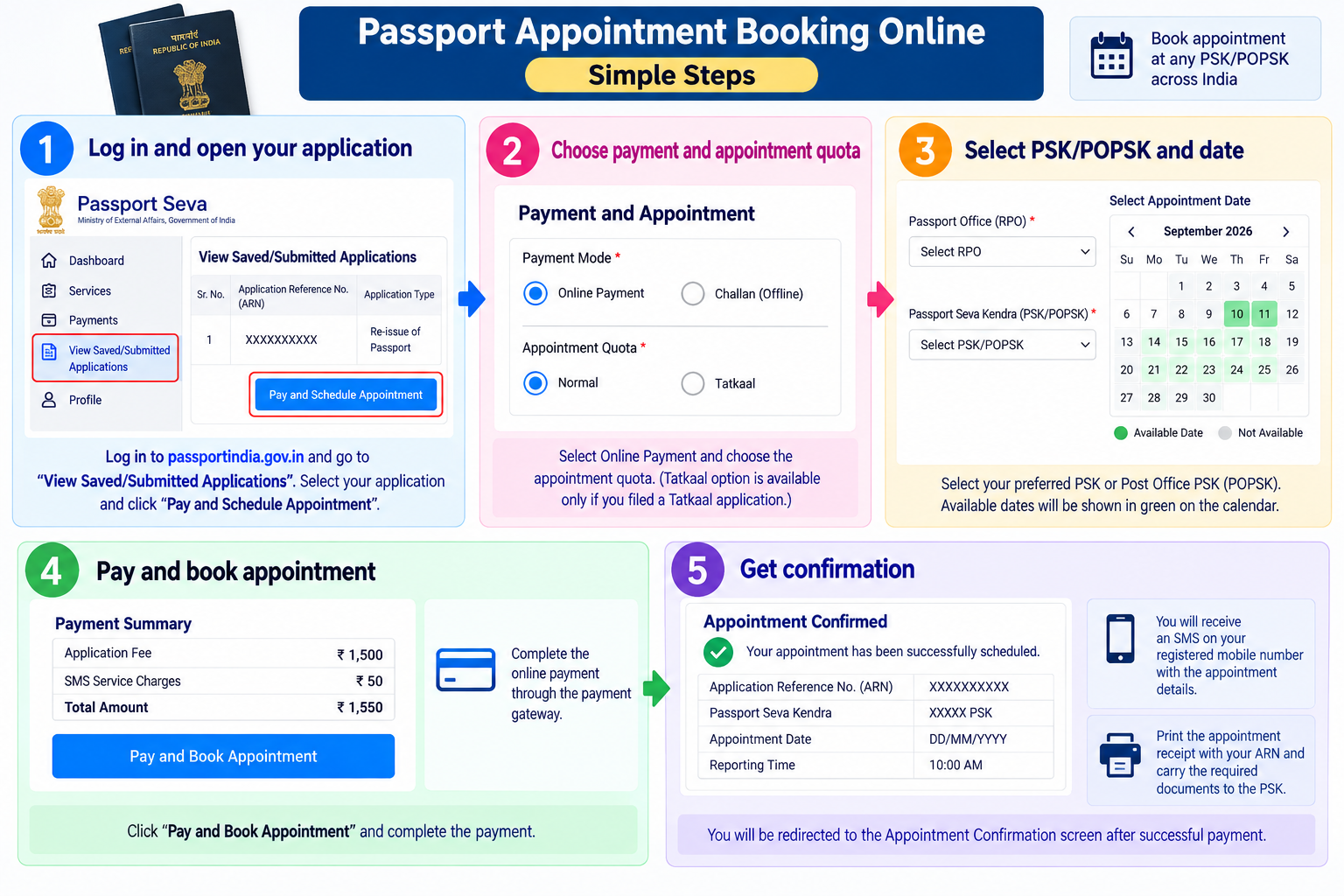
- Log in and go to View Saved/Submitted Applications.
- Select your application and click Pay and Schedule Appointment.
- Choose Online Payment, and select the appointment quota (Normal; Tatkaal shows only if you filed a Tatkaal application).
- Pick your preferred PSK or Post Office PSK (POPSK), available dates show in green on the calendar.
- Click Pay and Book Appointment and complete the payment.
- You’re redirected to the Appointment Confirmation screen, and an SMS arrives with the date and time. Print the receipt with your ARN.
When New Slots Are Released
Slots don’t trickle in through the day, they open in batches at set times, which is why timing your attempt matters:
- Normal slots: commonly released in the afternoon window (around 3 to 5 PM) for dates roughly 1 to 3 weeks ahead. Some centres also release around midnight, so early morning is worth a look too.
- Cancelled / rescheduled slots: these free up throughout the day as other applicants change plans, so keep checking.
- Tatkaal slots: open at a fixed daily time that varies by Passport Office, check the official “Appointment Opening Time” page for yours.
Be logged in and ready a few minutes before the release time at busy offices, popular PSKs can fill within minutes.
“No Appointment Available”? Try This
- Try a nearby POPSK, not the main metro PSK. Post Office PSKs in smaller towns often have dates weeks earlier. Since any centre is allowed, this is the single most effective trick.
- Refresh for cancellations. Freed slots appear all day, checking mid-morning and again in the evening surfaces them.
- Hit the release window. Be logged in just before the daily slot-release time for your office.
- Consider Tatkaal if your travel is close, it has its own quota and faster dates (higher fee). See our Tatkaal guide.
- Apply early. Start 2 to 3 months ahead so a tight slot situation never becomes an emergency.
Rescheduling or Cancelling
Plans changed? You don’t lose your payment:
- Log in, open your application, and use Schedule/Reschedule Appointment.
- A Normal appointment can be rescheduled up to three times; Tatkaal only once.
- Your paid fee stays valid, but remember the overall 90-day limit from form submission, miss that and you must reapply.
Common Questions
Do I pay a separate fee just for the appointment?
No. There’s no separate appointment fee, it’s the passport service fee, which you must pay to confirm any slot. Once paid, rescheduling within the allowed limits is free.
Why do slots show “not available” for weeks?
At busy metro offices, the daily batch fills within minutes of release. Try a smaller POPSK nearby, watch for cancellations through the day, or log in right at the release time. Any PSK across India is allowed, so widening your search usually finds a date.
Can I book without paying first?
No. Payment is mandatory before an appointment is confirmed at any PSK. The “Check Appointment Availability” tool lets you see dates without paying, but the actual booking needs payment.
What do I carry to the appointment?
Your appointment receipt (or the SMS), all original documents, and self-attested photocopies. Reach a little early, and note the appointment is only valid for the person named on it, you must attend in person.
Need Help?
For appointment issues, call the Passport Seva National Call Centre at 1800 258 1800 (toll-free), or use passportindia.gov.in. New to the process? See our fresh apply guide or the full Passport hub.