
How to Verify an Aadhaar Number
Employer, landlord, or individual? Confirm an Aadhaar number is genuine and active before accepting it as ID. Here are the official, free ways to verify, step by step.

Why Verify at All?
Anyone can print a realistic-looking Aadhaar, so the printed card alone proves nothing. Verifying confirms two separate things: that the 12-digit number actually exists in UIDAI’s records, and, if you scan the QR code, that the name and photo on the card genuinely belong to that number. For an employer, landlord, or business doing KYC, this is the difference between an ID you can trust and one you can’t.
Every method below is official and free. None of them reveals private data, so you’re not exposing the cardholder to any risk by checking.
Method 1: Scan the QR Code (Strongest Check)
The most secure and UIDAI-recommended method for verifying a card in person is scanning its QR code. The code contains digitally signed information that cannot be forged or edited.
- Get the scanner: install the official Aadhaar app or the dedicated Aadhaar QR Scanner from the Google Play Store or Apple App Store. It works entirely offline.
- Scan the card: open the scanner and point your camera at the QR code on the physical card, e-Aadhaar printout, or PVC card.
- Instant decryption: the app reads the digitally signed data inside the QR code.
- Match the details: it shows the cardholder’s demographic details and official photo. Compare the photo to the person in front of you, this is what catches a tampered or borrowed card.
Method 2: Verify the Number on the myAadhaar Portal
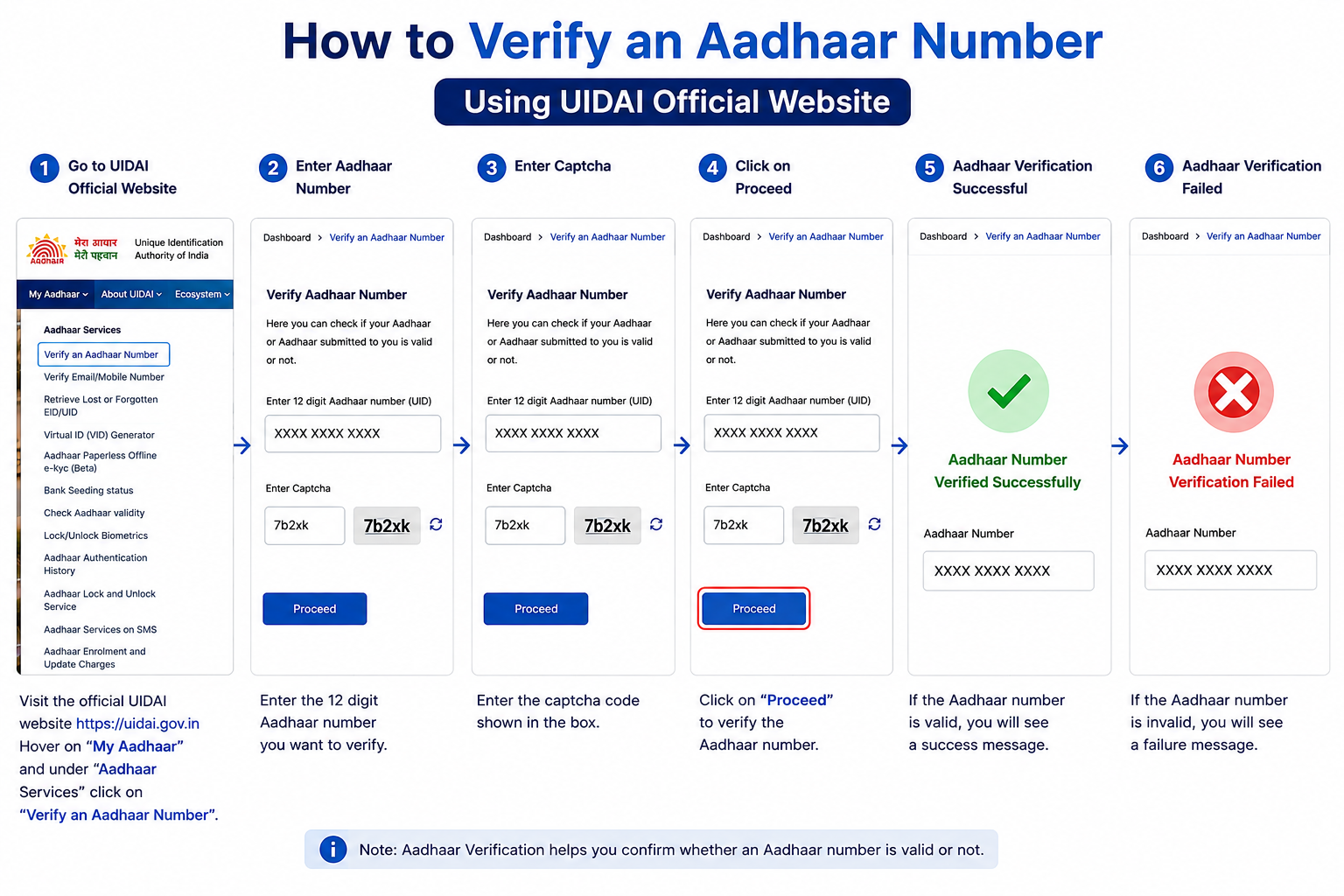
If you only have the number written down and no card to scan, you can confirm online whether it’s valid and active. This check needs no login and no OTP, so you can do it for any number in seconds.
- Open the service: go to
myaadhaar.uidai.gov.inand open Verify an Aadhaar Number under Aadhaar Services. - Enter the number: type the 12-digit Aadhaar number carefully, a single wrong digit will make it fail.
- Enter captcha: type the case-sensitive characters from the security image.
- Proceed and verify: submit the request for an instant result.
- Read the result: if valid, it confirms the number exists and shows limited details like age band, gender, state, and whether a mobile is linked, without exposing the full identity.
Method 3: Paperless Offline e-KYC (for Formal KYC)
For formal verification, like banking or a SIM, the Aadhaar holder can share a secure XML file instead of a physical copy.
- The Aadhaar holder visits the UIDAI website and selects Aadhaar Paperless Offline e-KYC.
- They enter their Aadhaar number or Virtual ID (VID) and set a share code.
- This generates a digitally signed file with their demographic details and photo, which you can verify against UIDAI’s signature without touching the live biometric database.
What the Results Actually Mean
- Valid and active: the number is genuine and in use. For an in-person check, still match the QR photo to the person.
- Valid, but details look wrong: the number is real, but the info attached to it in UIDAI’s records is outdated. The holder should update their Aadhaar details so it matches, otherwise KYC elsewhere will keep failing.
- Not found / invalid: the number doesn’t exist in UIDAI’s records. Double-check for a typo first; if it still fails, treat the ID with caution.
Common Questions
Do I need the cardholder’s OTP or permission to verify their number?
No. The basic “Verify an Aadhaar Number” check on the portal needs only the number and a captcha, no OTP or consent, because it reveals only limited, non-sensitive details. QR scanning is also instant and offline.
Does verifying show the person’s full name and address?
The online number check does not, it shows only an age band, gender, state, and mobile-link status. Full name and photo appear only when you scan the QR code on the actual card, which is meant for confirming the card belongs to the person holding it.
Is it legal to verify someone else’s Aadhaar?
Yes, checking whether a number is valid is a legitimate anti-fraud step and reveals no private data. What you must not do is store, share, or misuse someone’s full Aadhaar number, so verify, then avoid keeping a copy you don’t need.
Running Into Errors?
If a number shows as invalid when it clearly shouldn’t, or the page keeps failing, UIDAI’s helpline 1947 is available 24/7. Our quick reference page lists every official contact and link.