
Comprehensive Guide to Updating Your Aadhaar Address
Moved house? Update your Aadhaar address online, through the app, or at a centre. Here are the fees, accepted documents, and every method explained step by step.

If you have an address proof in your own name, the online portal is fastest and costs ₹75. No document in your name? Use the Head of Family route with a relative’s Aadhaar. No registered mobile? You’ll need to visit a Seva Kendra in person.
Fee Structure and Deadlines
| Update Method | Fee |
|---|---|
| Re-uploading existing address proof (myAadhaar) | Free till 14 Jun 2027 |
| Changing to a new address (online or at centre) | ₹75 per request |
| Head of Family update (via app) | ₹75 |
Accepted Proof of Address Documents
To complete a standard address update, you must provide a valid document that verifies your new residence. Commonly accepted documents include:
- Passport, Voter Identity Card, or Driving Licence.
- Ration Card or PDS Photo Card.
- Electricity, water, gas, or landline telephone bills, not older than three months.
- A valid rent, lease, or leave and license agreement.
- Property tax receipts, not older than one year.
The document must be in your own name. If it isn’t, the Head of Family route below is designed for exactly that situation.
Method 1: Standard Online Update
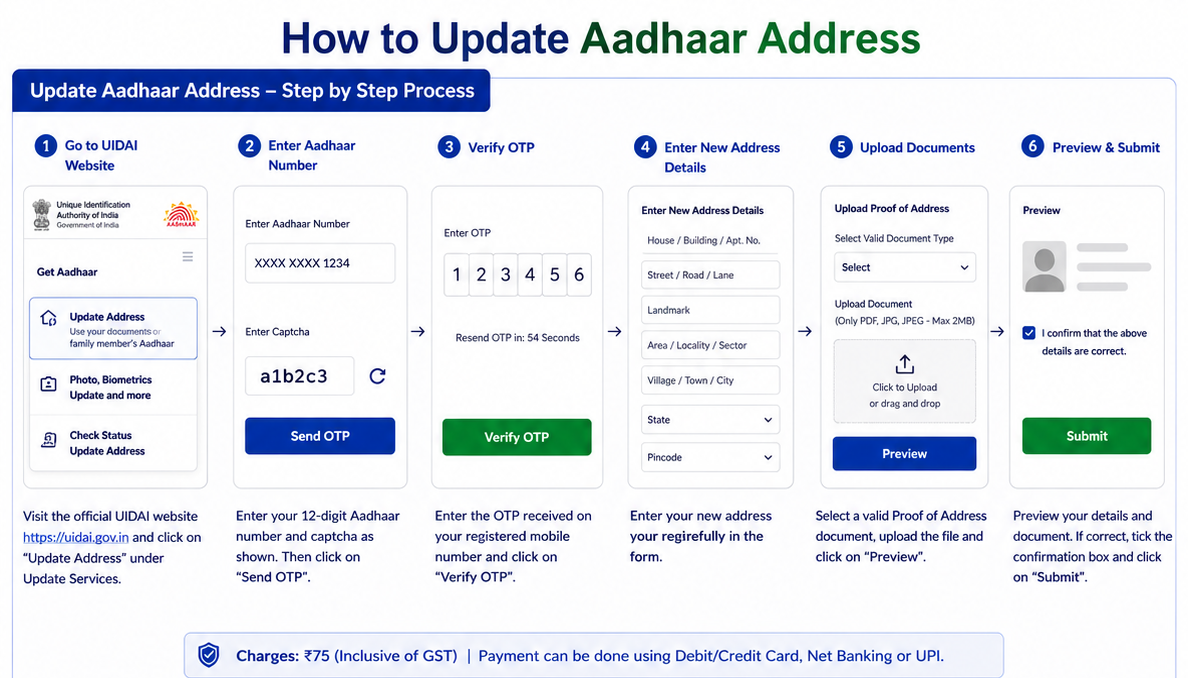
If you have a valid Proof of Address document in your name, the online portal is the most efficient method. Your registered mobile number must be active to receive the OTP.
- Visit the official UIDAI myAadhaar portal at
myaadhaar.uidai.gov.in. - Log in with your Aadhaar Number and the OTP sent to your currently registered mobile number.
- Select the Address Update option from the dashboard.
- Carefully enter the details of your new residential address.
- Upload a clear, scanned copy of your valid Proof of Address document (JPG, PNG, or PDF, usually under 2 MB).
- Submit the request and save the 14-digit Update Request Number (URN) provided on the acknowledgment receipt.
Method 2: Head of Family (HoF) via the Aadhaar App
Introduced for spouses, children, and parents who live at the same address but hold no address document in their own name, this route lets you borrow a family member’s address with their consent.
What you need
- The Head of Family’s 12-digit Aadhaar number (they must be above 18).
- A Proof of Relationship (PoR) document naming both you and the HoF, such as a ration card, marriage certificate, passport, or school marksheet.
- If no PoR document exists, the HoF can instead sign and upload a self-declaration in UIDAI’s prescribed format.
Step-by-Step Process
- Open the
Aadhaar Appand log in with your 6-digit PIN. - Go to Services, then select Address Update.
- Enter the HoF’s Aadhaar number (only validated, none of their other details are shown) and select your relationship.
- Upload your Proof of Relationship document, complete Face Authentication, and pay the ₹75 fee.
- Note the Service Request Number (SRN). The HoF receives an SMS asking them to approve.
- The HoF opens their own Aadhaar App, goes to Services then Family Member Requests, enters the SRN, and approves the request.
Method 3: At an Aadhaar Seva Kendra
If you do not have access to a registered mobile number, face technical issues online, or prefer in-person assistance, you can complete the address update at a physical centre.
- Book an appointment (optional): visit the myAadhaar portal to locate the nearest Aadhaar Seva Kendra or bank/post office enrolment centre, and pre-book a slot to avoid long waits.
- Fill out the update form: get the Aadhaar Enrolment/Update Form at the centre, or download and print it beforehand. Fill in your details and clearly state your new address.
- Document verification: present the form with the original of your valid Proof of Address document for verification.
- Biometric authentication: the operator verifies your application with a quick fingerprint or iris scan, so no OTP or registered mobile is needed here.
- Fee and receipt: pay the ₹75 fee at the counter and collect the acknowledgment slip with your 14-digit Update Request Number (URN).
How to Check Your Update Status
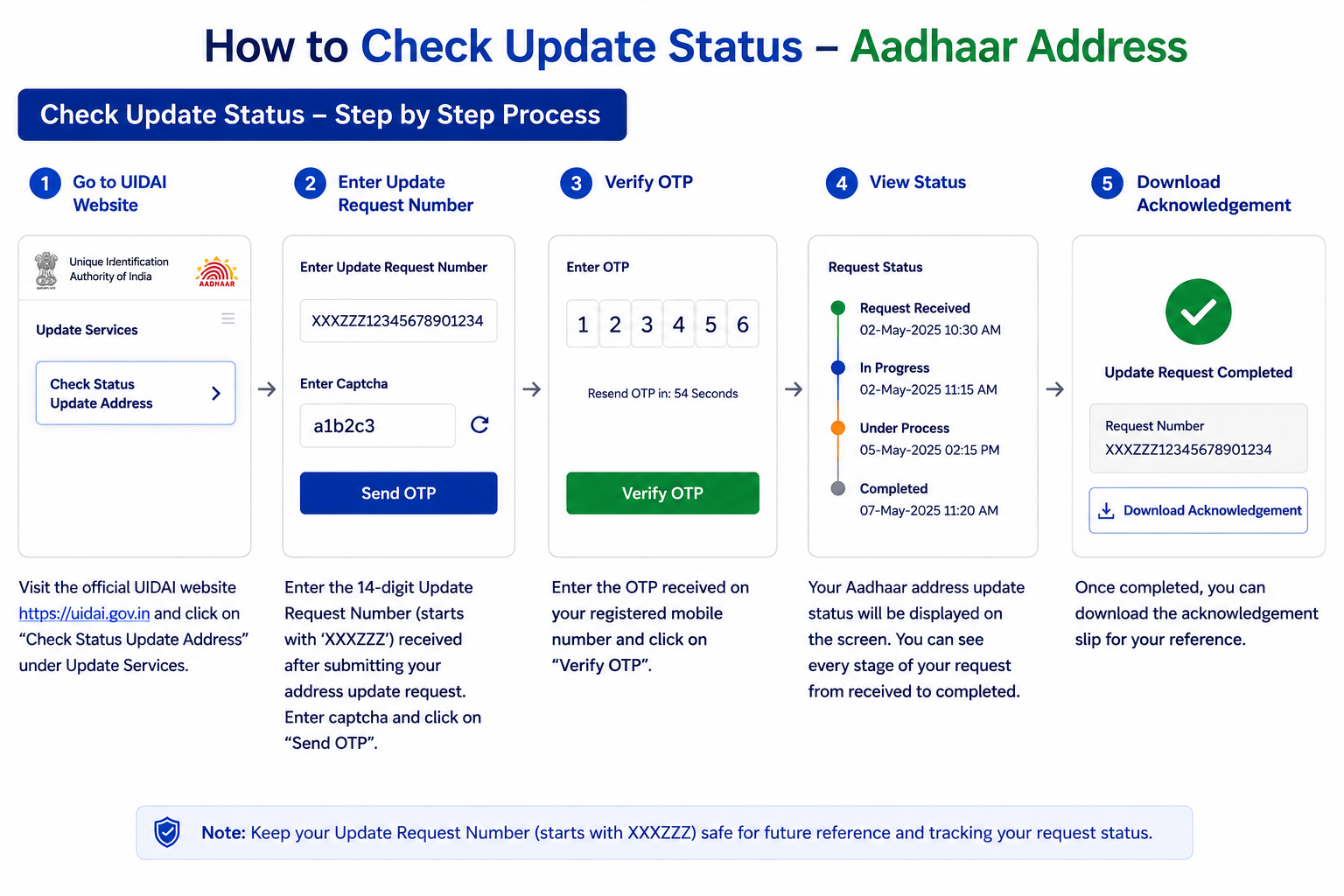
Once you have submitted a request through any method above, you can track its progress online.
- Visit the UIDAI myAadhaar portal and click Check Aadhaar Update Status.
- Enter your 14-digit URN or the Service Request Number (SRN) from your acknowledgment receipt.
- Enter the captcha code and submit.
- The screen shows whether your request is under process, rejected, or successfully generated.
Common Questions
Can I change my address if the proof isn’t in my name?
Yes, that’s exactly what the Head of Family route is for. As long as a relative at the same address has a valid Aadhaar and you can show a Proof of Relationship document (or they sign a self-declaration), you can update to their address without any document in your own name.
Is there a limit on how many times I can change my address?
No. Unlike name, date of birth, or gender, there is no lifetime limit on address updates. You can change your Aadhaar address as often as you genuinely relocate.
Do I need to update my address on Aadhaar every time I move?
It’s strongly advisable. A stale address quietly causes problems later, such as a bank rejecting your address proof, a gas connection transfer failing, or a passport application stalling, since many services verify against your Aadhaar record.
Need a Hand?
Run into trouble along the way? UIDAI’s toll-free line 1947 is open 24/7, and every official Aadhaar contact is listed on our quick reference page.