
How to Check Your Passport Application Status
Applied and waiting? You can track your passport in real time with just your File Number and date of birth, no login needed. This guide covers the exact steps, what every status message actually means, and what to do if your file is stuck.

What You Need: Your File Number
Tracking needs two things, no account or password:
- File Number, a 15-character code (format like
CH-1234567890123). It’s printed on the appointment receipt from your PSK, and also sent by SMS and email when you submit your application. - Date of Birth, exactly as in your application.
Lost your file number? Check the confirmation SMS/email from the day you applied, or log in to your Passport Seva account and open your submitted application, it’s shown there.
Tracking Online (No Login)
- Go to
passportindia.gov.inand open Track Application Status (under Services, or the homepage tile). - Select your Application Type from the drop-down.
- Enter your File Number and Date of Birth.
- Click Track Application Status, your current stage appears on screen.
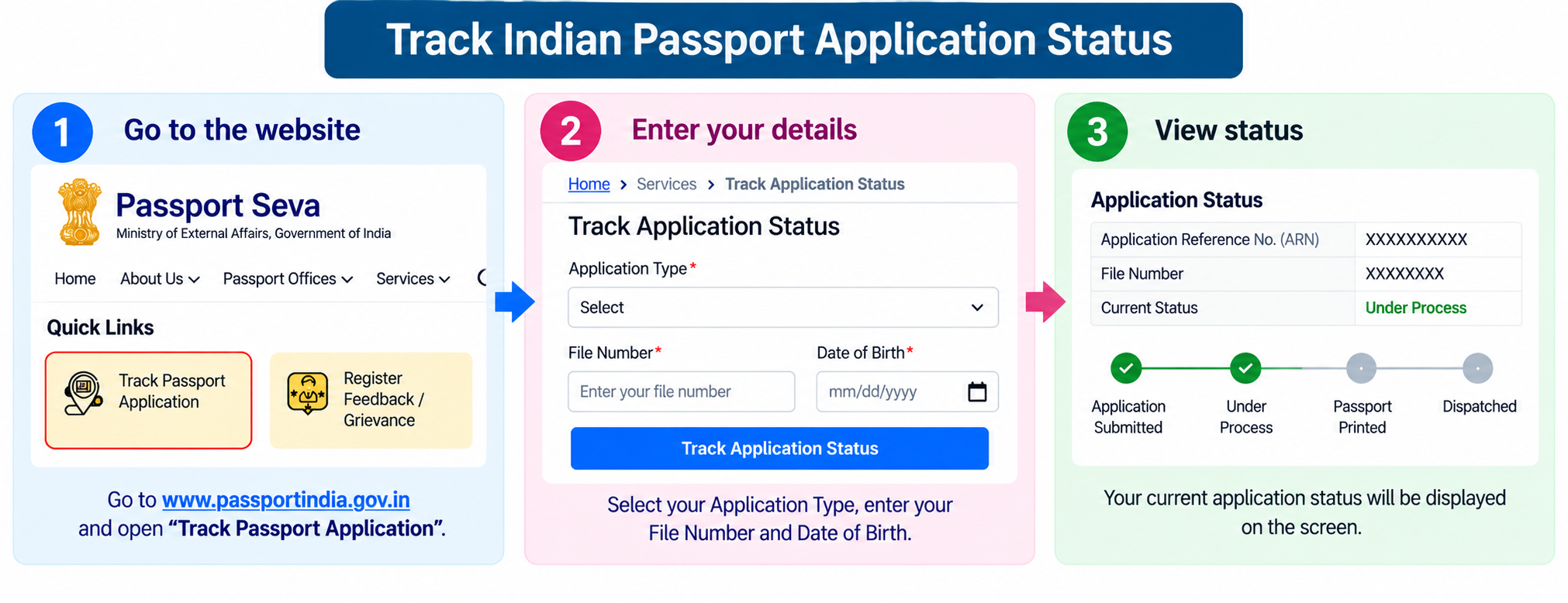
Status updates aren’t instant, allow 2 to 3 working days after each stage for the system to refresh.
What Each Status Actually Means
Most confusion comes from status wording that isn’t obvious. A file usually moves in this order, here’s what each stage means and what to do.
- Application Received / Submitted: your form and fee are in the system. Nothing to do.
- Under Review (at PSK or RPO): an officer is checking your documents. This is routine, not a problem. It usually passes in a day or two for a clean file.
- Police Verification Initiated: your file has gone to the local police (LIU) for address and background confirmation. Keep your original documents and two references ready, and be reachable at your registered address.
- Police Verification Cleared: good news, the report came back clean. The passport moves toward printing.
- Granted: the Passport Officer has approved your application, the decisive positive stage. Printing follows.
- Printed: the physical booklet has been made (printing happens at central facilities, so it can lag slightly).
- Dispatched: your passport is on its way by India Post Speed Post, with a consignment number you can track on the India Post site.
Checking Police Verification Separately
Police verification (PV) is tracked on its own page, useful when your main status sits at the PV stage for a while:
- On the portal, open Police Verification Status under Services.
- Enter your File Number and Date of Birth.
- It shows whether PV is initiated, in progress, or completed.
If PV shows “Incomplete”, the officer’s visit likely couldn’t be completed (you weren’t available, or an address issue). You can reschedule the visit through the portal or follow up at your local police station.
Track by SMS or the App
- mPassport Seva app: open the app, tap Track Application Status, and enter your File Number and DOB, the same result as the website.
- SMS: send
STATUS <File Number>to 9704 100 100 from your registered mobile. You get the current status by reply. Note this is a premium (paid) SMS service, so it costs more than a normal text, the free website and app tracker are usually the better route. - Call centre: the National Call Centre on 1800 258 1800 can also read out your status.
If Your Status Is Stuck
Most delays are at the police verification stage, they’re common due to police workload, not a sign of a problem. If it’s not moving:
- Give it time first. Allow 2 to 3 working days after a stage, and up to 2 to 3 weeks for PV in busy areas.
- Follow up with the police. If PV is stuck beyond about 3 weeks, visit your local police station, then the SP office, with your file number.
- Use the grievance system. Lodge a complaint on the portal or call 1800 258 1800.
- Visit the RPO enquiry counter if the status won’t change, sometimes a minor document mismatch is holding it, which you can fix on the spot or with a self-attested letter.
After “Dispatched”: Tracking the Delivery
Once the status shows Dispatched, your passport has left the Passport Office and travels to your address by India Post Speed Post, that’s the only authorised carrier. A separate tracking number takes over from here:
- Get your PP number: a dispatch SMS goes to your registered mobile with a 13-character consignment number (format like
PP581126104IN). It also appears on the portal’s status page. - Track it on India Post: enter that number on indiapost.gov.in’s Track & Trace, or SMS
POST TRACK <PP number>to 166 or 51969, for live scan-by-scan delivery updates. - Who can receive it: when it’s out for delivery, be at home with a valid photo ID, the postman hands it over only after ID verification. A failed attempt costs a full delivery cycle.
- If delivery fails: you can collect it directly from your delivery post office with the tracking number and photo ID, faster than waiting for re-delivery. If returned to the RPO, request re-dispatch or collect it in person.
Common Questions
Do I need to log in to check my passport status?
No. The Track Application Status tool is public, you only need your File Number and date of birth. No account, password, or OTP is required.
My status says “Under Review”, is something wrong?
No. “Under Review” simply means an officer is checking your file, it’s a normal step, not a red flag. For a clean application it usually clears within a day or two. Only act if it stays stuck for weeks.
What does “Granted” mean, is my passport ready?
“Granted” means the Passport Officer has approved your application, the key positive stage. The booklet is then printed and dispatched, usually within 2 to 5 days (or 1 to 2 days for Tatkaal). Watch for the “Dispatched” status with a Speed Post number.
How do I track a minor’s passport status?
Use the minor’s own File Number and date of birth, not the parent’s. Police verification is generally waived for minors, so a minor’s status often moves quickly from “Submitted” to “Granted”.
Need Help?
For a stuck or unclear status, call the Passport Seva National Call Centre at 1800 258 1800 (toll-free), or use passportindia.gov.in. New to the process? See our fresh apply guide or the full Passport hub.