
How to Retrieve a Lost Aadhaar Number or Enrolment ID
Forgotten your Aadhaar number (UID) or Enrolment ID (EID)? UIDAI offers free, secure ways to recover them online, through the app, at a centre, or by phone. Here is every method explained.

First, Which One Do You Need?
UID (Aadhaar Number) is your permanent 12-digit number. You’d retrieve this if you’ve forgotten it but your Aadhaar has already been generated.
EID (Enrolment ID) is the 28-digit reference on the slip you got at enrolment (a 14-digit number plus date and time). It’s useful mainly while a new Aadhaar is still being processed, or to download your e-Aadhaar before the UID is to hand.
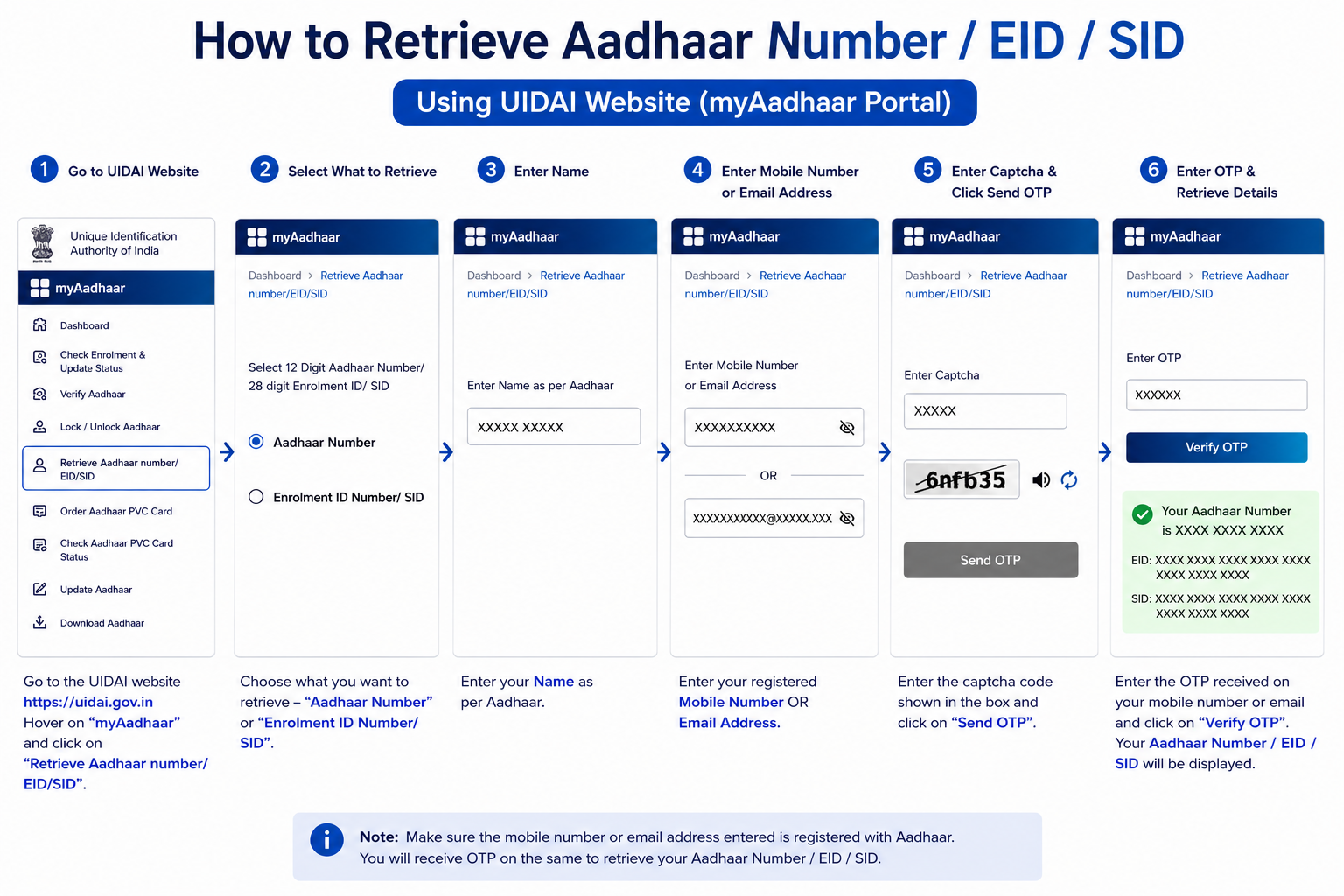
Method 1: Retrieve Online via myAadhaar Portal
If you still have the mobile number or email linked to your Aadhaar, the portal is the fastest route.
- Open the service: go to
myaadhaar.uidai.gov.inand open Retrieve Aadhaar Number / EID. - Choose what to retrieve: select Aadhaar Number (UID) or Enrolment ID (EID).
- Enter details: type your full name exactly as on your Aadhaar, plus your registered mobile number or email.
- Complete captcha and click Send OTP.
- Verify: enter the OTP. Once verified, your UID or EID is sent by SMS to your linked mobile (or email, if you entered that). This service is free.
Method 2: Retrieve Through the Aadhaar App
The official Aadhaar app offers the same retrieval on your phone, handy if you’re already set up on it.
- Open the Aadhaar app and choose Retrieve EID/UID.
- Select whether you want your UID or EID.
- Enter your full name and registered mobile or email, then the captcha.
- Request the OTP, enter it, and your UID or EID is sent to your registered contact.
Method 3: Retrieve at an Aadhaar Seva Kendra
If your mobile and email are both unregistered or inaccessible, this is your route, it verifies you by biometrics instead of an OTP.
- Visit a centre: go to your nearest Aadhaar Seva Kendra or permanent enrolment centre.
- Give demographic details: share your name, gender, and district or PIN code. If several records match, extra details like year of birth or state help narrow it down.
- Biometric check: provide a single fingerprint or iris scan.
- Get your details: once matched, the operator retrieves your UID/EID and can give an e-Aadhaar printout. A small fee may apply for the printout.
Method 4: By Phone (1947)
You can also call the toll-free helpline 1947. Either speak to an executive, who can trace your EID after confirming your demographic details, or use the automated IVRS: pick your language, choose the enrolment option, and follow the prompts. This works best when a mobile number is still linked for confirmation.
Common Questions
Can I retrieve my Aadhaar if I’ve lost access to my registered mobile and email?
Not online, both OTP routes need a linked contact. In that case you must visit an Aadhaar Seva Kendra, where your identity is confirmed by fingerprint or iris scan instead of an OTP. It’s also a good moment to update your mobile number so future retrieval is easy.
Is retrieving a lost Aadhaar number free?
Online and app retrieval are completely free. At a centre, the retrieval itself is free but a small fee may apply if you also want a printed e-Aadhaar. Anyone demanding a large “recovery fee” is not an official channel.
Once I have my number back, what should I do?
Download a fresh e-Aadhaar for your records, and if your linked mobile was the problem, update it so you don’t get locked out again. Avoid saving your full number in unsecured places like chat apps or email drafts.
Can’t Get It Back?
If retrieval keeps failing or you’re not sure which contact is linked, UIDAI’s helpline 1947 is available 24/7. Every official portal and contact is gathered on our quick reference page.