
How to Update Your Aadhaar Mobile Number
Change your Aadhaar linked mobile number from home using the official app and Face Authentication, or at a Seva Kendra. Here are the fees, steps, and how to track it.

You can update your number even if you’ve lost your old SIM. The update is verified by an OTP to your new number plus Face Authentication, so no OTP is ever sent to the old one.
Lost Access to Your Old Number? Start Here
This is the most common worry, so it’s worth clearing up first: you do not need your old registered mobile number to update it. Whether that SIM is lost, disconnected, was reassigned to someone else, or was never registered at all, you can still change it.
The update is authenticated by the OTP sent to your new number combined with Face Authentication (in the app) or your biometrics (at a centre), never by an OTP to the old number. That design is deliberate: it keeps a hacker from changing your number just because they briefly had your old SIM.
Not sure what number is currently linked? On the portal, use the Verify Email/Mobile Number tool, enter your Aadhaar and a number, and it tells you instantly whether that number is on file, without sending any OTP.
Fee Structure
| Update Method | Fee |
|---|---|
| Mobile number update via app | ₹75 per request |
| Offline update at a centre | ₹75 per request |
Method 1: Update via the Official Aadhaar App
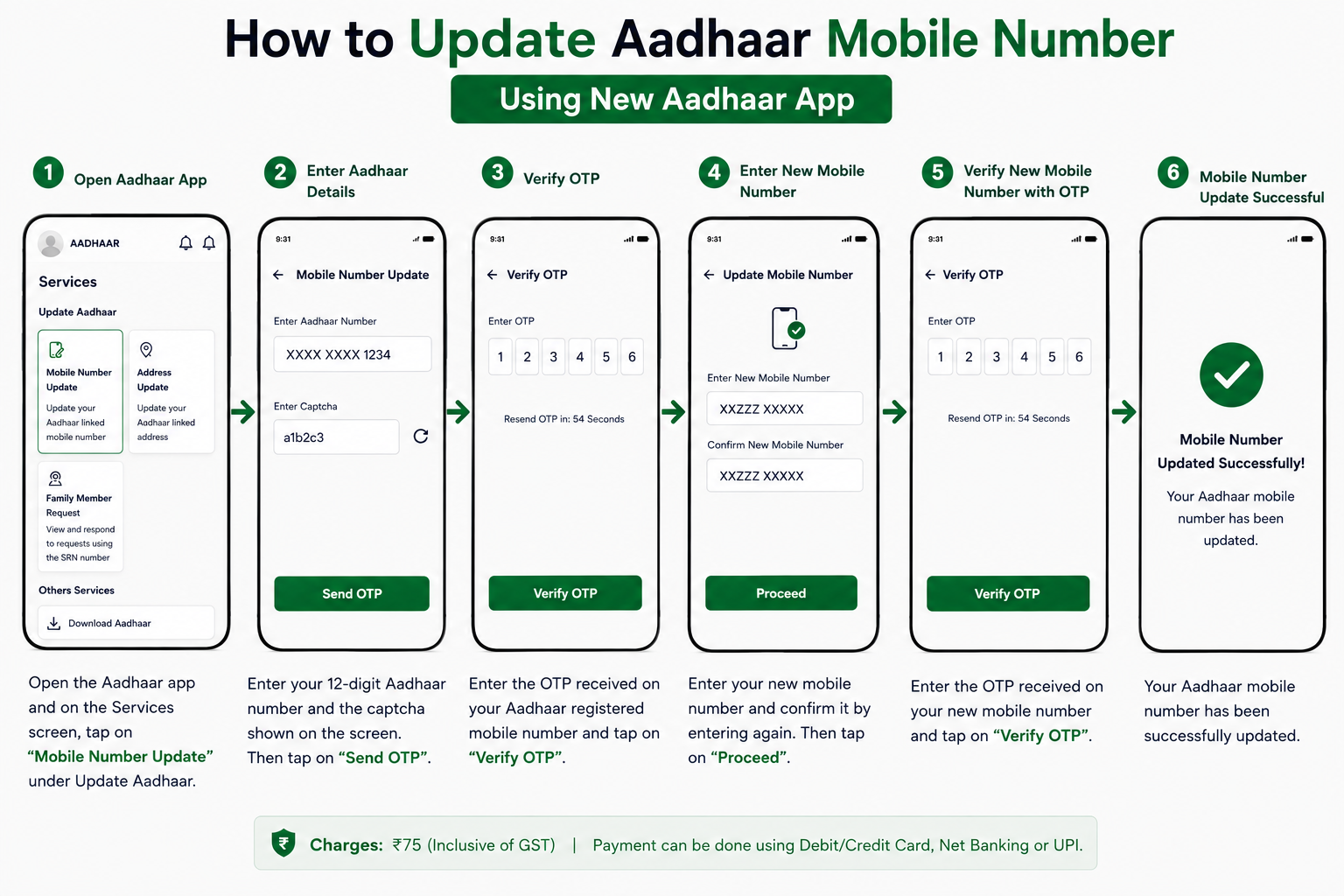
This feature removes the need to visit an enrolment centre for a mobile number change. You will need a smartphone with a working front camera for face authentication.
Step-by-Step Process
- Download or update the app: make sure you have the latest version of the official Aadhaar app from the Google Play Store or Apple App Store.
- Register using Face ID: open the app, enter your Aadhaar number, and complete the initial Face Authentication. You’ll be prompted to create a 6-digit PIN for future access.
- Locate the service: log in with your PIN, go to Services, and under Update Aadhaar select Mobile Number Update.
- Enter the new number: type the new mobile number you want to link.
- OTP verification: enter the one-time password sent to that new number.
- Face authentication: the app runs a final face scan using your front camera. Make sure you’re in a well-lit area.
- Payment: pay the ₹75 fee securely through the app.
- Confirmation: once payment and face verification succeed, your request is submitted and you receive a Service Request Number (SRN) to track it.
Method 2: Offline Update via Aadhaar Seva Kendra
If you don’t have a smartphone, can’t complete face authentication, or prefer in-person help, you can update your number the traditional way.
- Locate a centre: use the official UIDAI website to locate your nearest Aadhaar Seva Kendra or an authorised bank or post office enrolment centre.
- Fill the form: get an Aadhaar Update Form at the centre and fill in your Aadhaar number and new mobile number. No documents are required.
- Biometric verification: submit the form; the executive authenticates you with a fingerprint or iris scan.
- Pay the fee: pay the ₹75 update fee at the counter.
- Receive acknowledgment: collect the slip with your 14-digit Update Request Number (URN).
How to Check Your Update Status
Mobile number updates typically process within a few days, and up to 30 days.
- Visit the UIDAI myAadhaar portal and click Check Aadhaar Enrolment & Update Status.
- Enter your 14-digit URN from the centre, or the Service Request Number (SRN) from the app.
- Enter the captcha and submit to see whether the update is in process or successful.
Once the Aadhaar status shows as successful, your new number is active and ready to receive Aadhaar-related OTPs. A good final check is to download a fresh e-Aadhaar using the new number.
Common Questions
Can I update my mobile number online without visiting a centre?
Yes. The official Aadhaar app now lets you update your number from home using an OTP to the new number plus Face Authentication. A centre visit is only necessary if you can’t use the app or face authentication fails.
Do I need my old number to receive an OTP?
No. No OTP is sent to the old number at any stage. Verification happens through your new number and either Face Authentication (app) or biometrics (centre), so a lost or disconnected old SIM is not a problem.
Can I link two mobile numbers to one Aadhaar?
No. Only one mobile number can be registered as primary for OTPs and official communication at a time. Updating simply replaces the old number with the new one.
Get Support
If something doesn’t go to plan, UIDAI’s helpline 1947 answers 24/7. For every official portal and contact in one spot, see our quick reference page.