
Masked Aadhaar: Download & Uses
Share your Aadhaar safely. Learn what a Masked Aadhaar is, why it protects your privacy, and how to download one in minutes, using only official resources.

What Exactly Is a Masked Aadhaar?
A Masked Aadhaar is a legally valid digital version of your official Aadhaar card where the first 8 digits of your number are hidden, showing only XXXX-XXXX-1234.
It still displays your full name, photograph, address, date of birth, and the official UIDAI secure QR code.
Why Should You Use It?
- Data leak protection: stops hotels, private employers, and service providers from storing your full 12-digit UID in unencrypted databases.
- Fully legally valid: under Section 4(3) of the Aadhaar Act, 2016, a Masked Aadhaar carries the same legal weight as a regular Aadhaar card across India.
- Reduces fraud risk: prevents unauthorized individuals from using your full number for financial scams.
Masked Aadhaar vs e-Aadhaar vs PVC Card vs Aadhaar Letter
UIDAI treats all of these as equally valid forms of Aadhaar, to be used by you as you choose. Its circular of 30 September 2020 says they must be accepted without giving preference to one over the other. What differs is what each one is, and how you get it.
| Form | What it is | How you get it |
|---|---|---|
| e-Aadhaar | Password-protected PDF that shows your full 12-digit number. Suits online forms and KYC where the full number is needed. | Download free from myAadhaar |
| Masked Aadhaar | The same PDF with the first 8 digits hidden. Suits hotels, gyms, couriers and other places that only need to see your ID. | Download free, and tick the masked option |
| PVC card | Durable, easy-to-carry card with multiple security features. Suits keeping in your wallet. | Ordered on myAadhaar for a fee and delivered by post. See our PVC card guide |
| Aadhaar letter | Laminated paper document. Suits keeping the original paper copy. | Issued by UIDAI after enrolment or update |
How to Download Your Masked Aadhaar
You can download a fresh copy in under 2 minutes through two official channels.
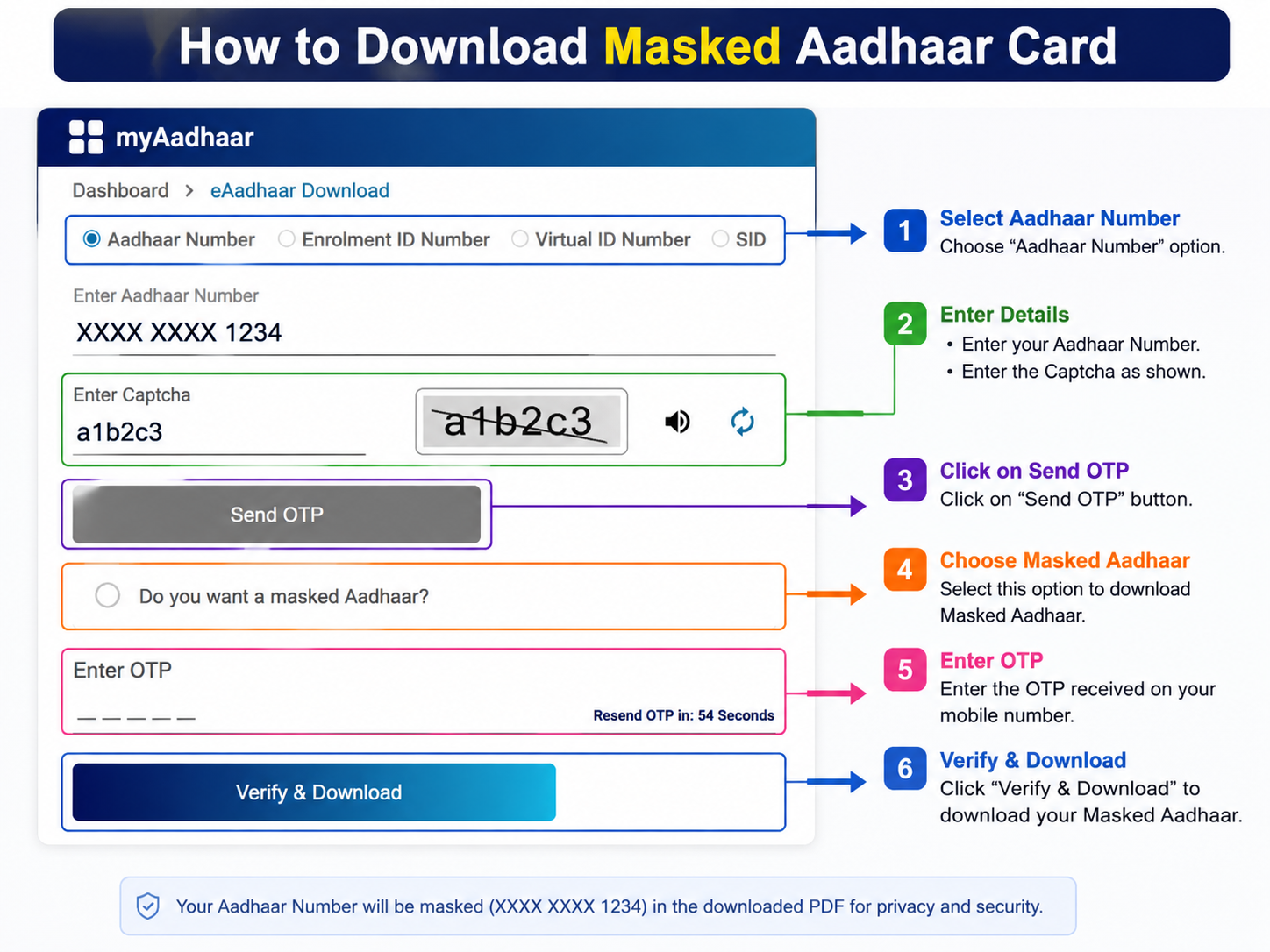
Option A: Via the Official Web Portal
myaadhaar.uidai.gov.in
Go to
myaadhaar.uidai.gov.inand click Download Aadhaar.Select your identifier: Aadhaar Number, Enrolment ID (EID), or Virtual ID (VID).
Enter your details with the on-screen captcha and click Send OTP.
Crucial step: on the verification page, check the box that asks “Do you want a masked Aadhaar?”
Enter the 6-digit OTP sent to your registered mobile number and click Verify & Download.
Option B: Via the mAadhaar Mobile App
Best for iOS & Android users
Open the official mAadhaar app on Android or iOS.
Tap Download Aadhaar on the main dashboard.
Select Masked Aadhaar.
Choose your identifier type, enter the details, and authenticate with the OTP.
The password-protected PDF saves automatically to your device.
Where It’s Accepted, and When You Might Still Need the Full Number
UIDAI’s own guidance is that a masked Aadhaar can be used anywhere you only need to show Aadhaar as identity proof, not where the process specifically runs an authentication check against your full number.
- Generally fine with masked: hotel or PG check-in, gym or coaching centre sign-up, courier or delivery ID checks, membership forms, and most places that just want to see a valid photo ID.
- May need the full number instead: processes that run actual Aadhaar-based e-KYC or OTP authentication, such as certain bank account openings or SIM re-issues, since these verify you directly against UIDAI’s system rather than just reading the printed digits.
If a private organisation insists on your full unmasked number just to keep a photocopy on file, it’s reasonable to ask what specific requirement makes that necessary. You’re not obligated to hand over more than the situation genuinely calls for.
Quick Checks Before You Share It
- How to tell if a PDF is masked: open it and check the Aadhaar number field. Masked copies show
XXXX-XXXX-1234; regular copies show all 12 digits. - Already downloaded the regular version? There’s no official UIDAI tool to mask an existing PDF after the fact. You’ll need to download a fresh copy and tick the masked option at the OTP verification step.
- Sharing digitally instead of a PDF? The mAadhaar app also lets you show or share a masked QR-based profile, so you don’t always need to send a file at all.
Opening Your Downloaded PDF
A Masked Aadhaar PDF is encrypted using the same password format as a regular e-Aadhaar: the first 4 letters of your name in capitals, followed by your birth year (YYYY).
For the full breakdown with worked examples, see our e-Aadhaar password guide.
Common Questions
Is a masked Aadhaar accepted as valid ID proof?
Yes, for most purposes where you only need to show Aadhaar as identity, like hotel check-ins or private KYC. It carries the same secure QR code and legal standing. The main exception is processes that run a full Aadhaar authentication against your number, which may need the regular version.
Can I convert an already-downloaded regular Aadhaar into a masked one?
No. There’s no official tool to mask an existing PDF after the fact. You simply download a fresh copy and tick the masked option at the OTP verification step.
Does a masked Aadhaar cost anything?
No. Downloading a masked e-Aadhaar from the official UIDAI portal or the Aadhaar app is completely free, exactly like a regular e-Aadhaar.
What’s the password to open the masked Aadhaar PDF?
It’s the same as any e-Aadhaar: the first 4 letters of your name in capitals followed by your birth year (YYYY). See our e-Aadhaar password guide for worked examples.
Is a PVC card more valid than a masked Aadhaar?
No. UIDAI’s circular of 30 September 2020 lists the PVC card, Aadhaar letter, e-Aadhaar, Masked Aadhaar and mAadhaar as equally valid forms of Aadhaar, and says they should be accepted without preferring one over another.
Need Help?
For download issues or lost credentials, call UIDAI’s toll-free helpline at 1947 (24/7), or see the full list of official Aadhaar contacts and links.